
Enrich the main 8 attributes for AI-driven results
One-click enrichments from your Merchant Center and Google Ads data. Bring other sources (e.g., PDF, CSV or XML files) for even better enrichments.
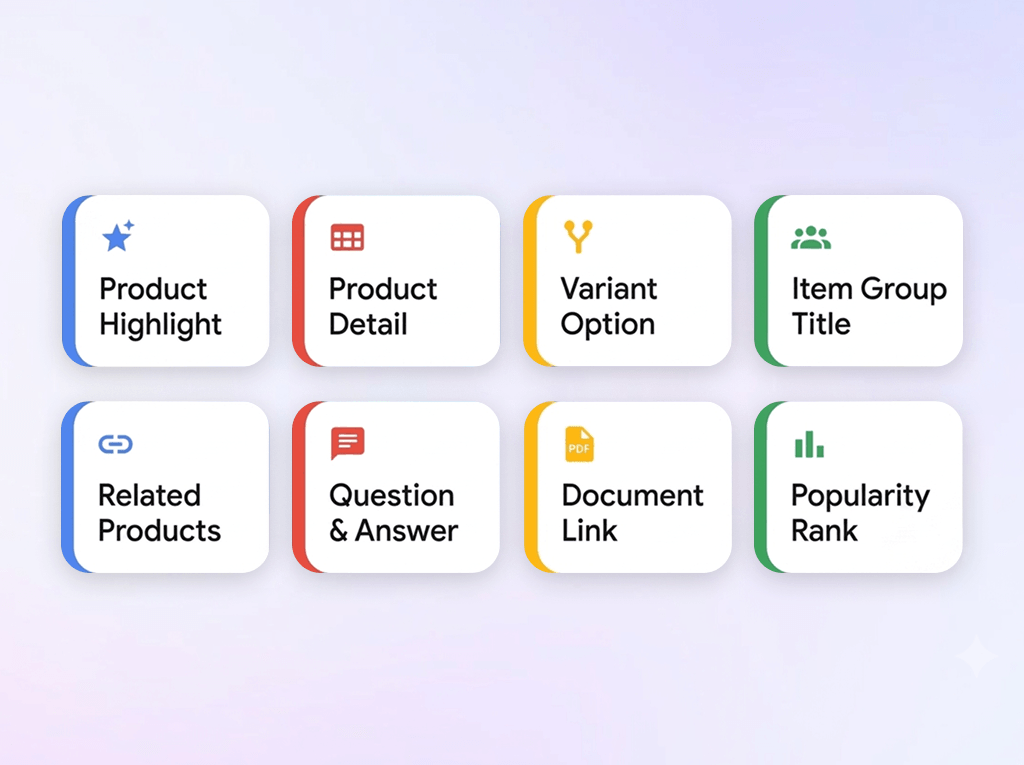
Is your GMC feed ready for GEO?
93% of Merchant Center catalogs are not optimized for GEO
Unoptimized product data
Your GMC primary feed is sending low-quality, generic product data directly to Google. Without rich details and critical attributes, the platform struggles to match your items effectively, leaving your ad budget draining on poorly targeted traffic.
Generalist feed tools
Your current feed manager wasn't built specifically for Google Merchant Center. This one-size-fits-all approach misses key optimization opportunities. Relying on generalist tools limits your ability to scale on Google Ads, Gemini, AI Overview, and AI Mode.
One-click enrichments
Using Google Ads and Merchant Center data, Clarmix enriches the 8 conversational attributes, following UCP's best practices and formats.
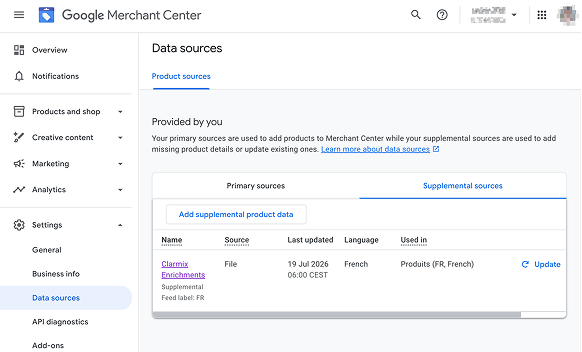
Enrichments are sent to GMC via a supplemental feed, so that your products get cited in AI chats.
Prepare for AI-driven shopping queries in a few clicks
3 steps to get your feed ready for AI Overviews and Gemini
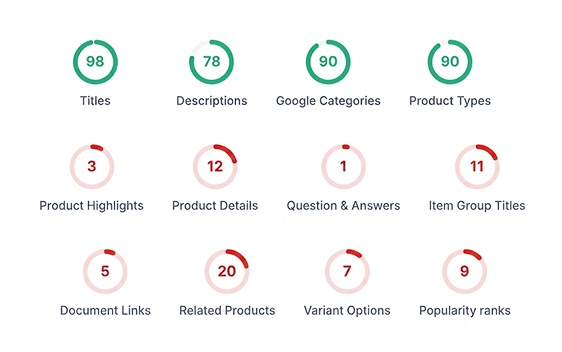
The audit - 100% free
Connect Merchant Center, and Clarmix will scan the eight conversational attributes from each SKU:
[product_highlight],
[product_detail],
[question_and_answer],
[item_group_title],
[document_link],
[related_product],
[variant_option],
[popularity_rank]
Generate conversational attributes
Clarmix reads your existing product data, Google Ads keywords, or custom files (via PDF, CSV, or XML). Our fine-tuned AI model then transforms this input into optimized conversational data. This new capability seamlessly integrates alongside our existing generation features, including titles, descriptions, and product categories.
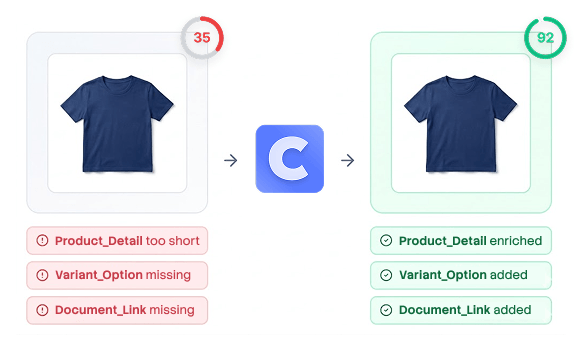
Sync to Merchant Center
After our AI generates your optimized product attributes, you can review and modify them at will. Clarmix then deploys these rewrites directly to your Google Merchant Center via a hands-free supplementary feed. Your primary feed remains completely untouched and secure.
How it works
Securely link your GMC via Google’s official API.
Get an instant 0-100 quality score and detailed breakdown of all issues affecting your feed.
Pick products, and generate conversational attributes.
Push optimized data to GMC through a supplemental feed. Your primary feed won’t be modified.
What is your feed health score?
Conversational attributes in action!
See how Clarmix generates the 8 conversational attributes for your Merchant Center feed
Why teams choose Clarmix
The smartest way to manage Google Shopping feeds at scale
Autopilot feed performance
Set it and forget it. Daily automated audits, AI-powered fixes, and real-time sync mean your feed stays optimized 24/7 without lifting a finger.
Save time
Stop wasting hours manually fixing feed errors. What used to take your team days now happens in minutes.
Brand safe
We setup strong guardrails to always deliver best semantic enrichments (titles, descriptions, categories, etc) and prevent hallucinations.
Built for agencies & eCom
Wether you’re an agency or an e-commerce brand, it’s easy to collaborate on Clarmix.
Is product enrichment right for you?
Find if enriching your product catalog is a must for your e-commerce store.
Great fit if...
Not ideal if...
Still not sure? Try it free for 7 days and see the results yourself.
Trusted by top performance agencies & fast-growing e-commerce brands



.png)
.avif)





F.A.Q about conversational attributes enrichment in Merchant Center
Everything you need to know about optimizing conversational attributes in your GMC feed to boost SEO, SEA, GEO, and GEA.
No, Clarmix creates a supplement feed in your GMC account, so that your primary source remains untouched. Like this, your primary source can keep being updated by your feed manager or CMS (Shopify, WooCommerce, etc.), and the supplemental source created by Clarmix will come on top.
Short answer: no. Before generating conversational attributes to improve GEO and get mentioned in AI overviews, you should focus on the base attributes from your catalog. These are titles, descriptions, Google categories, product types, GTIN, and images. Furthermore, make sure your product feed doesn't have any errors that prevent products from being listed in other sources.
Your feed manager sends data to the primary source of your Google Merchant Center account. Clarmix then retrieves all the products from your primary source. Most feed manager tools are great for normalizing data across many sources, but they aren't specialized in Google Ads. That's why Clarmix always comes on top of your GMC primary source.
The synchronization is made once per day, early in the morning. Your Merchant Center receives up-to-date data from Clarmix and then sends it to your Google Ads account.
No, Clarmix does not override your CMS catalog, whether you are on Shopify, PrestaShop, Magento, WooCommerce, or others. Our tool simply creates a supplemental feed in your Google Merchant Center account containing enriched product attributes. These new attributes are then used on Google Shopping and by most common AI chatbots.
Upon creating a Clarmix account and integrate GMC and Google Ads, our system will scrape your website to analyze its content, brand positioning, tone of voice, etc. It will then analyze the search terms from your PMax and Shopping campaigns on Google Ads. Finally, it scans your product catalog to get the full context. You also have the option to add external data sources such as CSV, XML files, or PDF documents.
If you provide it through XML, CSV, or PDF, external data can be injected and then used to get a better quality output. However, Clarmix does NOT scrape any other sources of data in order to avoid having inaccurate details, text, or any hallucinations in your results.
No. You do not need to prompt or add guidelines since Clarmix already has the full context needed based on your search keywords, industry, positioning, product data, tone of voice, etc. However, if you want to add specific guidelines, such as “always add my brand name at the end of product titles”, this is feasible.