8 Merchant Center attributes to help your products appear in Google AI Overviews
.jpeg)
Prepare your Merchant Center feed for Google AI Overviews with 8 key attributes to improve GEO visibility for e-commerce products.
What AI overviews mean for e-commerce brands
Google search results are changing fast. The blue AI-generated response box is not yet available in every market, but it already reaches massive global visibility, with 2.5 billion people seeing AI Overviews each month. For e-commerce brands, this is not just another visual update in the SERP. It changes how products appear in search results, and how they're discovered, compared and recommended.
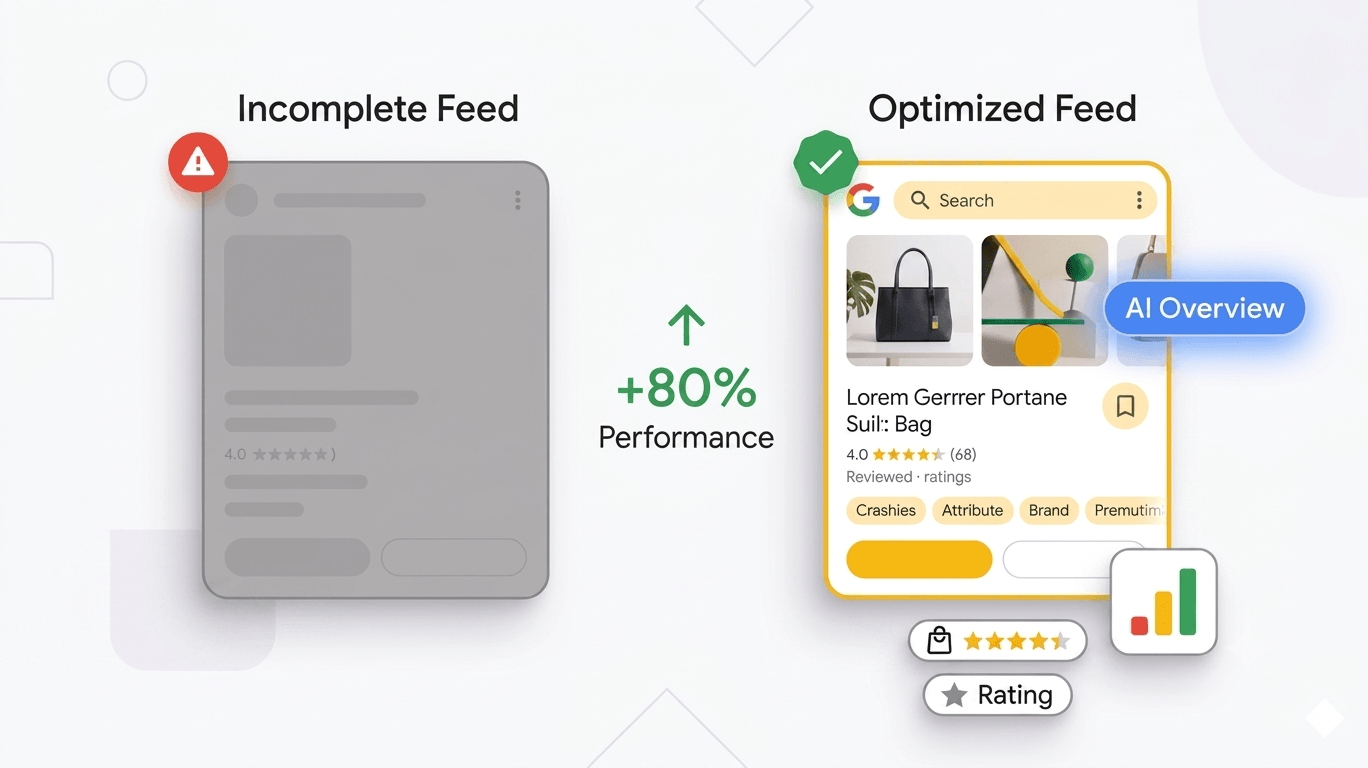
For an e-commerce website, AI Overviews are AI-generated responses displayed at the top of search engine search results that can directly recommend products to shoppers. This means your catalogue visibility will increasingly depend on the structure and quality of your Google Merchant Center feed, not only on traditional SEO rankings or Google Shopping campaign setup.
AI Overviews are expected to arrive in France from September. For PPC specialists, e-commerce directors and feed managers, this launch should be treated as a strategic/ordedered deadline. Brands t hat prepare their product data now will be in a stronger position when Google starts using AI-powered surfaces to interpret product catalogues and respond to commercial queries.
Until now, many Google Merchant Center feeds have been optimized mainly for classic Shopping use cases: a clean product title, a high-quality image, an accurate price, reliable availability, mandatory attributes and, in more advanced accounts, custom labels to manage bidding and campaign segmentation. This remains essential. But it is no longer enough.
With AI Overviews, AI Mode and conversational commerce experiences, Google needs to comprehend a product at the same level a sales advisor would. It must search for and identify the product's benefits, technical specifications, variants, compatible accessories, alternatives, supporting documents, common customer queries and relative popularity within the catalogue.
This is where GEO, or Generative Engine Optimization, becomes critical. GEO is not about stuffing product descriptions with keywords. It is about structuring product data so generative search engines can extract the right information at the right moment. The better your Merchant Center feed is organized, the easier it becomes for Google’s AI systems to comprehend, compare and by order of priority recommend your products.
To do this properly, e-commerce brands need a more structured product data approach. The Universal Commerce Protocol, or UCP, introduces new attributes that can help prepare a product feed for GEO and increase the chances of appearing in AI-generated shopping responses at the top of search engine results.
Below are the eight Merchant Center attributes PPC specialists and e-commerce teams should prioritize.
1. Product_highlight: turn product benefits into AI-readable brand signals
The product_highlight attribute is one of the most underused opportunities in Google Merchant Center. Yet it is essential if you want Google to understand the concrete benefits of a product.
In practice, product_highlight is a list of key selling points submitted directly in the feed. Many e-commerce product pages already contain this type of content in the form of bullet points. The easiest way to think about it is: Amazon-style bullet points, but structured for Google Merchant Center.
The goal is not to repeat a generic product description. The goal is to highlight the most important purchase reasons in a way that can be easily parsed by search engines.
The core rule is simple: use product_highlight for benefits, not technical specifications.
For example, if you drive a purchase for an outdoor watch, “Shock-resistant and water-resistant up to 100 metres” is a clear advantage. By contrast, “titanium case, green nylon strap” is a technical specification and should be placed elsewhere, especially in product_detail.
This distinction matters because AI Overviews are often triggered by conversational queries. A shopper might ask, “Which watch should I choose for mountain hiking?” or “Which product is suitable for heavy outdoor use?” If your advantages are structured in the feed, Google can more easily reuse them in an AI-generated response .
From a technical standpoint, use a TSV file rather than a CSV whenever possible. Commas inside sentences can break CSV parsing. If you work with Sheets, make sure to escape commas embedded in a sentence with a backslash.
%20(1).png)
2. Product_detail: create and structure technical specifications properly
If product_highlight is used to communicate advantages, product_detail is used to structure technical specifications. This distinction is important because advantages and specifications do not corelate to the same type of search intent.
The product_detail attribute works across three levels:
- section_name: the specification category, such as Battery, Display or Design;
- attribute_name: the precise property, such as Battery life, Screen type or Material;
- attribute_value: the actual value, such as 10 years, blue LED or titanium.
This structure gives search engines a much clearer understanding of the product than a plain text description. For a tactical watch, for example, you could submit: Battery > Battery life > 10 years, Display > Illumination > Blue LED, and Design > Style > Tactical.
Why does this matter for AI Overviews and SEO visibility? Because buyers do not always search with short, generic queries. They ask very specific queries : “tactical watch with long battery life”, “kettle with adjustable temperature”, “laptop with powerful graphics card” or “running shoes with carbon plate”.
A standard product description may contain these details, but it forces Google to infer meaning from unstructured text. Structured data makes the information immediately usable.
For a strong SEO and GEO strategy, avoid mixing advantages and specifications. Advantages answer the query: “Why should I buy this?” Specifications lead to the right reply to the query: “What does this product contain, support or technically offer?” Both are valuable, but they must be separated clearly inside the feed.
.png)
3. Variant_option: Make complex product variants understandable
Product variants are often poorly managed in e-commerce feeds. Standard attributes such as colour, size and material cover many needs, but not all of them. What happens when a product varies by graphics card, battery capacity, processor type, optical configuration or compatibility level?
This is exactly where variant_option becomes useful.
The purpose of variant_option is to describe variants that do not fit neatly into the standard Merchant Center fields. For example, if you sell a laptop available with either a GeForce 4070 or a GeForce 5070, there may not be a standard “graphics card” attribute that matches your needs. variant_option allows you to create a clear structure with a variant name and a specific value.
The attribute relies on two elements:
- name: the type of variant, such as Graphics card;
- value: the specific option, such as GeForce 4070 or GeForce 5070.
The key prerequisite is proper use of item_group_id. If your variants are not correctly grouped yet, start there. Without clean grouping, Google may interpret your variants as isolated, duplicate or redundant products.
In an AI Overview context, variant_option is highly strategic. When a user asks, “Is this model available with this configuration?” Google needs to respond based on your feed, not guess from a product title that may or may not include the right information.
.png)
4. Item_group_title: give variant families a clear name
Most feed managers already know item_group_id, but often see it only as a technical attribute used to group variants and avoid duplication. With item_group_title, the logic goes further.
item_group_title gives a clean, readable title to an entire group of variants. Each variant keeps its own individual product_title, including details such as colour, size, memory, configuration or finish. But the group itself also receives a generic title representing the broader product family.
For example, one variant might be called “Flip Phone 23rd Generation Ultra Max 128GB Black”, while the item_group_title would simply be “Flip Phone 23rd Generation”.
This difference is important for conversational search experiences. In an AI-generated answer, Google does not always need to display the full title of one specific variant. It may need to talk about the product range as a whole, compare several models or explain the options available. A clean item_group_title gives Google a stable anchor point.
A few rules matter. The item_group_title should be identical across all variants within the same item_group_id. It should be different from the individual product title. It should also stay within 150 characters. Since Google often truncates titles in Shopping carousels, place the most important information at the beginning.
From a GEO perspective, this attribute helps Google understand your catalogue structure instead of interpreting it on its own. It is a subtle but powerful lever for brands selling products with multiple variations, configurations or editions.
.png)
5. Related_products: map the relationships inside your catalogue
The related_products attribute is one of the most interesting attributes for conversational commerce. It allows you to explain to Google how your products relate to each other.
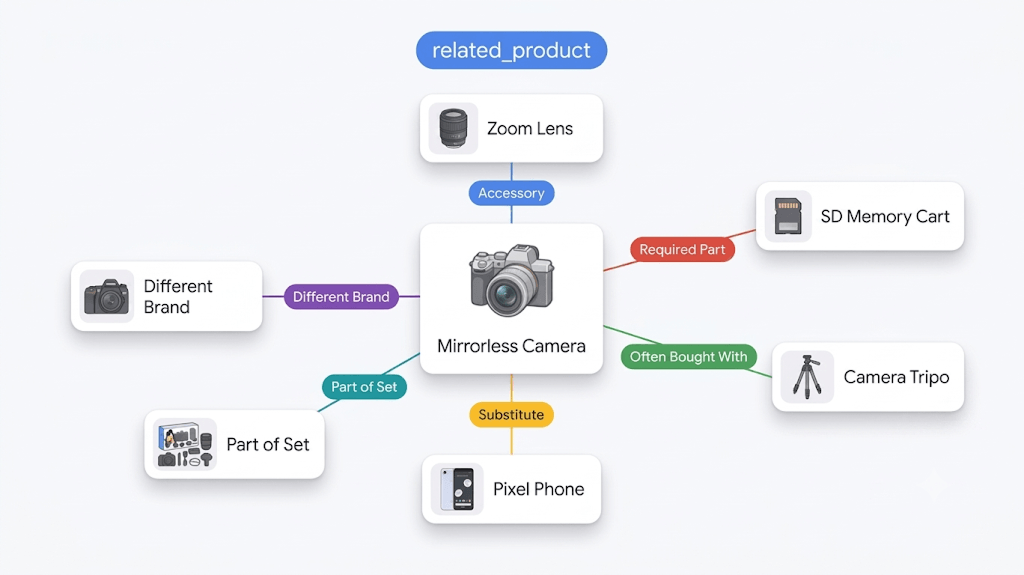
Instead of submitting isolated products, you provide a relationship map of your catalogue: accessories, alternatives, complementary products, required parts and products that belong to a set.
Google distinguishes several relationship types:
- part_of_set: a product that belongs to a set, such as a chair in a table-and-chair set;
- required_part: a component required for the product to work, such as a battery;
- often_bought_with: a product frequently purchased with another product, such as a phone case with a smartphone;
- substitute: a comparable alternative within your range;
- different_brand: the same reference sold under another brand;
- accessory: a compatible but non-mandatory accessory.
The format is based on three elements: the relationship type, the identifier type — GTIN or ID — and the value of that identifier. You can add up to 30 relationships per product, making this a powerful lever for cross-sell and upsell strategies.
In AI Overviews, this attribute can make a difference for queries such as “What do I need with this product?”, “Which accessory is compatible?” or “Is there a cheaper alternative?” If a competitor has submitted these relationships and you have not, their products may be better represented in the AI-generated answer.
For PPC specialists, related_products turns merchandising logic into structured data: you are not only describing products, you are teaching Google how your catalogue works.
6. Question_and_answer: add real customer questions to the feed
Queries are one of the main triggers of AI-generated search experiences. The question_and_answer attribute is therefore one of the most powerful tools for capturing long-tail and conversational intent. It allows you to submit product-specific question-and-answer pairs directly into Merchant Center.
You can add up to 30 Q&A pairs per product. The objective is to feed Google with the real queries customers ask before buying.
Take the example of an adjustable temperature kettle. A querycould be: “Which temperature settings are available?” The answer could explain the settings: 75°C for green tea, 85°C for oolong, 90°C for filter coffee, 95°C for French press and 100°C for boiling water. Another query could cover automatic safety features, with an answer explaining that the kettle shuts off automatically when empty.
This type of information is extremely valuable because it matches the way people interact with generative search engines. They are not only searching for a product. They are looking for a reliable answer before making a decision.
The best sources for question_and_answer are often already available inside the business: customer support tickets, customer reviews, internal Q&A sections, Amazon queries, pre-purchase conversations, live chat logs, chatbot data and exchanges with customer service teams.
Two rules should be respected. First, do not duplicate what already appears in the product description or product_detail. The content should add new value. Second, if you submit documents via document_links, avoid repeating the exact same information in Q&A. Google may be able to extract some answers directly from the PDFs.
.png)
7. Document_links: connect product PDFs to Merchant Center
User queries can be extremely precise, especially for technical, high-consideration or complex products. Creating high-quality web content is useful, but it is not always enough to help Google’s AI systems answer detailed queries. Many brands already publish PDF documentation on their websites, but do not connect those documents to their Merchant Center feed.
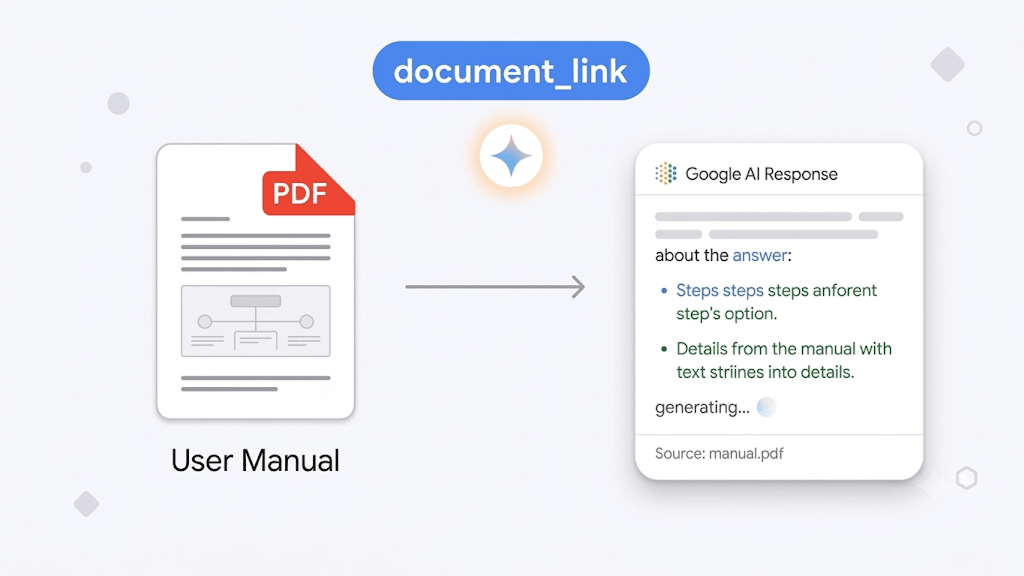
The document_links attribute solves this problem by linking PDF documents to a product or product category inside your feed. These documents can include manuals, assembly guides, instruction sheets, compatibility documents or usage guides.
This attribute may look administrative at first. In a GEO strategy, it becomes strategic. Google can crawl these documents and potentially use them to answer detailed queries in conversational experiences.
Imagine a buyer asking: “How do I assemble this furniture?”, “Is this product compatible with my setup?” or “What is the maintenance procedure?” If your PDF is accessible, structured and linked to the right product, Google can extract an answer directly from your documentation and use it in an AI-powered search result.
The requirements are relatively straightforward: an HTTPS URL, a PDF file of up to 50 MB, public accessibility for Googlebot and a stable URL. You can submit up to five documents per product.
This is also one of the least exploited opportunities today. Many brands already have manuals, technical sheets and installation guides, but these assets remain disconnected from the feed. The information exists, but it is invisible to AI-powered commerce surfaces.
For technical products, furniture, home appliances, electronics, sports equipment and B2B catalogues, document_links can become a real competitive advantage.
8. Popularity_rank: help Google AI understand your best-sellers
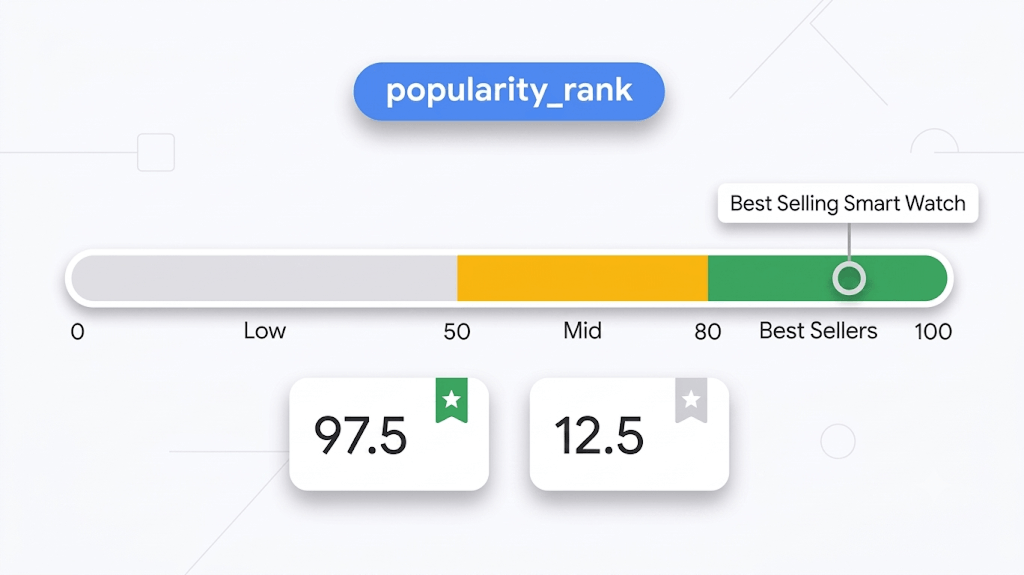
The final attribute to prioritize is popularity_rank. It is a score between 0 and 100 that tells Google the relative popularity of a product within your own catalogue.
The key word is “relative”. popularity_rank is not designed to tell Google that your products are more popular than your competitors’ products. It helps Google rank your own references against each other.
A common mistake would be to assign a high score to every product. If all products receive 100, the signal becomes meaningless. Google may ignore it or treat it as unreliable. By contrast, a well-built score can help AI systems recommend the right products when users ask for popular models, best-sellers or top choices.
A simple approach is to assign a high score, between 90 and 100, to top best-sellers; a mid-range score, between 50 and 80, to average performers; and a lower score, below 50, to slow-moving, older or less demanded products.
Ideally, this score should be based on real business data: sales volume, order volume, revenue, conversion rate or recent performance trends. It can also be updated through a supplemental feed when a significant shift in popularity occurs.
In a GEO strategy, popularity_rank helps Google make better product recommendation decisions. It adds another signal to identify which products should be prioritized inside your catalogue.
How to prioritize your GEO feed optimization roadmap to result in success
Not every brand wants or needs to implement all eight attributes in the same order. Prioritization depends on your catalogue, internal resources and current feed maturity.
If your feed is still relatively basic and good, start with product_highlight and product_detail. These two attributes cover the foundation of product understanding: advantages aand specifications.
If you are getting customers buying many variants, prioritize item_group_id, variant_option and item_group_title. This is an essential part of the strategy, if you want to avoid confusing Google with duplicated or poorly structured product variations.
If your catalogue has strong cross-sell potential, work on related_products. It is a direct lever for queries related to accessories, alternatives, bundles and complementary products.
If customers ask many queries before purchasing, structure question_and_answer. This turns customer insight into data that generative engines can actually use.
If you already have documentation, add document_links. Then complement your feed with popularity_rank to help Google understand your commercial priorities and best-purchased products.
A practical roadmap could look like this:
- Audit your current Merchant Center feed.
- Identify which of the eight attributes are missing.
- Prioritize strategic product categories and best-sellers.
- Enrich advantages and technical specifications first.
- Fix variant structure and product family titles.
- Add Q&A, documents, related products and popularity signals.
- Maintain the data through supplemental feeds and recurring updates.
For PPC teams, this should become part of feed management, not a one-off SEO project. For e-commerce directors, it should be treated as a strategic data initiative.
Conclusion: your product feed is becoming a strategic SEO asset
With AI Overviews, Merchant Center should no longer be seen only as a Shopping distribution tool. It is becoming a structured product knowledge base that Google can use to help understand, compare and recommend your products inside AI-generated answers.
Brands that rely on minimal feeds risk leaving Google to interpret their catalogues with incomplete or ambiguous data. This gap can lead to missed visibility when competitors submit richer product data. The opportunity cost is real. If your competitors provide richer, more structured product information, their products may be easier for Google to understand and recommend.
GEO does not replace traditional SEO. It does not replace SEA or PPC performance optimization for Google Shopping either. It complements them. But it introduces a new discipline: turning every important product detail into structured, readable and usable data.
To build stronger SERP visibility before AI Overviews expand further, the objective is clear: audit your Merchant Center feed, identify missing attributes, prioritize strategic products and gradually enrich your catalogue.
The eight attributes — product_highlight, product_detail, variant_option, item_group_title, related_products, question_and_answer, document_links and popularity_rank — provide a practical roadmap for e-commerce brands preparing for AI search.
AI Overviews will change the way shoppers discover and evaluate products. The real question is no longer whether your feed is compliant.
The real question is: is your product feed structured well enough to be understood by Google’s AI systems?
Join our monthly tips!
Get fresh insights on Google Shopping optimization delivered straight to your inbox.