How to update tROAS on PMax campaigns after Google's August 2026 bidding update
.jpeg)
This article discusses the updates to Google's Target ROAS and Target CPA bidding strategies in Performance Max campaigns, elucidating their impact on campaign efficiency
Starting August 17, 2026, Google Ads will make Target ROAS and Target CPA bidding strategies follow the number you set more closely once an account is marked "limited by budget." If your Performance Max effort has a 300% tROAS but has been earning 500% because the spend cap held it down, that gap may start to close. For any Google Ads user managing a fixed monthly amount, this does not mean panic, but it does mean the safety margin many advertisers have relied on is shrinking. The fix is simple to state and harder to execute: audit every budget-limited PMax campaign, compare actual return on ad spend to that number, and raise it gradually toward the number your business actually needs.
This matters most for e-commerce accounts on a fixed monthly budget, where Performance Max already carries most of the workload.
How target ROAS bidding works in Google Ads
Target ROAS, short for target return on ad spend, is one of Google Ads' automated bidding strategies. You set a target ROAS value as a percentage, and Google's algorithm adjusts bids for you in real time across every ad group and listing group in the campaign, trying to hit that number on average. This is different from Target CPA, or Target Cost Per Action, which optimizes toward a cost per conversion instead of a revenue ratio. Advertisers who are not sure whether to use CPA or Target ROAS bidding should consider order value: Target ROAS tends to work better for a catalog where prices vary a lot, since it lets Google optimize towards conversions that carry the most value rather than the most volume.
To set a target ROAS in Google Ads, you first need accurate conversion tracking, with conversion actions set up correctly and conversion value data attached to each one, usually flowing in from your ecommerce platform or from Google Analytics. If you have not set conversion tracking up yet, do that before you touch a bid strategy. Without reliable conversion data, a bidding strategy built around this has nothing solid to optimize against, and campaign performance will look inconsistent no matter what number you choose. Once tracking is confirmed, you can run Target ROAS on Shopping campaigns, standard Search campaigns, or Performance Max, and Google will use signals such as device, location, time of day, audience, and item type to optimize bids for each auction.
The important thing to understand is that a target ROAS bidding strategy in Google Ads is not a fixed rule the platform follows exactly. It is a goal the algorithm tries to achieve on average across the campaign, using historical data and Google's AI to predict which clicks are likely to convert at a given value. That is also why allowing Google a little more flexibility, through a slightly wider budget or a less restrictive bid strategy, tends to help a new campaign reach stable performance faster. For any Google Ads account with steady conversion volume, it is a great, low-effort form of optimization: you rarely need to adjust bids manually once you decide to use Target ROAS bidding, since that lever is the one you move.
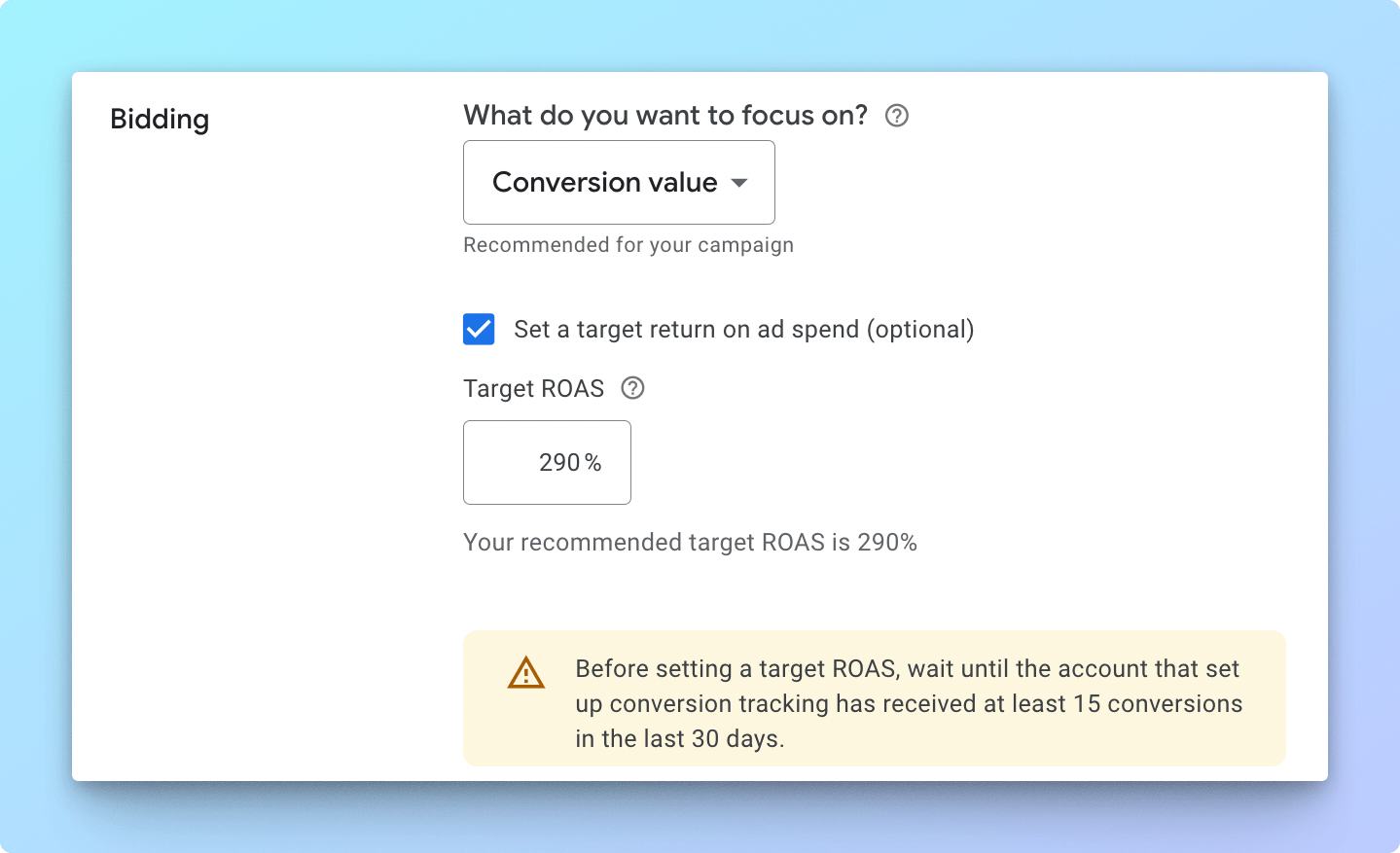
What is changing with target ROAS
Today, an account that is limited by budget can still outperform its stated goal. A Performance Max effort with a 300% tROAS might deliver 500% ROAS in practice, because the spend cap constrains how much of Google's Smart Bidding system is willing to spend. In effect, the budget has worked as a second brake on the bid strategy, letting performance run ahead of the target you set.
After the update, Google says budget-limited campaigns using target-based bidding will more consistently perform toward the target you entered. A campaign running at a 300% tROAS may start settling closer to 300%, even if it has spent the past year at 500%.
That changes what a target ROAS value is for. It stops being a loose guardrail and becomes closer to the actual return on ad spend you are asking Google's algorithm to deliver.
Why this matters for Performance Max campaigns
Performance Max spans Shopping, Search, YouTube, Display, Discover, Gmail and Maps in one campaign. Search Engine Land's coverage of the change notes that multi-channel formats like Performance Max and Demand Gen may see their traffic mix shift once the updated bidding behavior takes effect.
So the impact will not only show up as a lower average ROAS. It can also show up as a different product mix, a different channel mix, or a shift between branded and non-branded demand, and between first-time and returning customers. If your tROAS is set too low, Google's Smart Bidding has more room to chase volume at a lower efficiency level, which can quietly change who a campaign is reaching.
The hidden risk in a budget-limited PMax campaign
Take a typical setup for a mid-sized e-commerce advertiser:
Before the update, this setup worked well by accident. The tROAS was 300%, but the budget cap kept the campaign efficient and it landed at 500%. After the update, that gap has less reason to hold. If that number stays at 300%, the campaign can drift toward it over time.
ROAS will not necessarily collapse overnight. But if the business needs 450-500% to stay profitable, leaving tROAS at 300% is now a real risk rather than a safe cushion.
Don't leave Target ROAS bidding on autopilot
The clearest practitioner insight to come out of this update is that advertisers should not assume past overperformance will continue unchanged. Several PPC managers read the change as Google removing a kind of hidden bid-down behavior for budget-limited campaigns: historically, when the budget was capped, Google could prioritize cheaper conversions to stretch it further. Under the revised behavior, campaigns are expected to track closer to the actual target CPA or target ROAS you set.
That raises a direct question: should you raise tROAS to match what the campaign has actually been achieving? The answer is yes, but carefully. Jumping straight from a 300% figure to 500% can restrict conversion volume too fast, especially in a $10,000-a-month account where there is not much room to absorb a sudden drop in scale.
How to audit your PMax campaigns
Start by exporting campaign-level data for the last 30, 60 and 90 days. Look for campaigns where three things are true at once: the campaign is Performance Max, it is marked "limited by budget," and actual ROAS is materially higher than the target ROAS.
For a $10,000-a-month account, a useful working definition of "material" is actual ROAS running at least 20-30% above the current setting. Smaller gaps usually do not justify an immediate change.
How much should you increase target ROAS
For most mid-sized e-commerce accounts, small, staged increases are safer than one large jump.
Google recommends waiting one to two conversion cycles before judging performance after a shift like this. This matters even more for e-commerce brands with delayed conversions, repeat purchases, or an average order value that swings from month to month.
The goal is not the highest ROAS you can reach. It is aligning Smart Bidding with what your business can actually afford to pay for a sale.
Set a target ROAS that reflects your real margins
One of the most common mistakes is setting tROAS based only on recent platform performance, without checking it against the business. A better approach is to calculate your true break-even ROAS using gross margin, cost of goods sold, shipping costs, payment fees, returns, discounts, agency fees, customer lifetime value, the difference between first-time and returning customer value, and any cash-flow constraints.
If an account is running at 500% ROAS but the brand can scale profitably at 400%, then 400% is likely the better number. If the brand's real break-even point is 450%, leaving tROAS at 300% is unnecessary risk, not a safety margin.
Avoid running one target ROAS across the whole account
Performance Max performs best when each campaign's goal reflects the role that product or segment plays in the business. A single account-wide tROAS can push the algorithm to treat very different products the same way.
This structure stops high-margin and low-margin products from being judged against the same efficiency goal.
Should you switch to maximize conversion value
Google says advertisers who want to maximize results within a fixed budget can switch to Maximize Conversions or Maximize Conversion Value. For e-commerce PMax campaigns, though, running Maximize Conversion Value without a target ROAS removes the ROAS floor entirely.
That can work in specific cases, but it carries risk when margins vary a lot by category, conversion value tracking is imperfect, low-margin products are mixed in with the rest, branded and non-branded traffic are not separated, or the account does not have much conversion volume to work with. For a $10,000-a-month account, it is usually safer to keep a target ROAS in place for core campaigns and test Maximize Conversion Value only as a controlled experiment on a smaller campaign.
Target CPA vs Target ROAS: which bidding strategy fits your account
Advertisers weighing CPA or Target ROAS often ask which bidding strategy performs better for e-commerce. Target Cost Per Action tells Google Ads to hold the average cost of a conversion at a fixed number. The ROAS option instead asks Google to hold a ratio of revenue to spend. For a catalog with a wide price range, a flat cost-per-action approach can push spend toward the cheapest items, while a revenue-based approach lets pricier, high-value items earn more of the budget because they generate more conversion value per sale.
There is no single right answer for every advertiser. A subscription box with one flat price point may do just as well on a cost-based strategy, since every sale is worth roughly the same. A mixed e-commerce catalog with items ranging from $20 to $500 almost always benefits more from a bidding strategy built around ROAS, since it lets Google's Smart Bidding weigh a sale by what it is actually worth rather than treating every click the same.
Consider testing both if you are not sure which fits your account. Run one campaign on a cost-per-action approach and a comparable campaign on a revenue-based bidding strategy, with similar spend and audience, then compare the revenue each one drives over a full reporting cycle before you commit either at the account level.
Conversion tracking and Google Analytics checklist before you change anything
Before you touch any bid strategy, confirm the conversion actions in the account are correct. A common cause of a bidding strategy underperforming has nothing to do with Google's algorithm and everything to do with conversion tracking that double-counts sales, misses mobile checkouts, or still fires on a cancelled order. Pull a sample of recent orders from your ecommerce platform and match them against the conversion data Google Ads reports for the same period. If the numbers are close, tracking is healthy. If they are far apart, fix tracking first.
Google Analytics, or whatever analytics platform your team uses, is a useful second source of truth here. Import revenue and conversion data from Google Analytics into Google Ads, or at minimum keep the two systems reconciled, so a shift in reported ROAS after this update is not mistaken for a tracking error, and a real tracking error is not mistaken for a genuine drop in ROAS. Getting this right before you adjust anything saves time later, since every decision after this point depends on the account's conversion data being accurate.
What to monitor for revenue after you set a target ROAS
Once you change a target, do not judge the result on campaign-level ROAS alone. Track actual ROAS against the target, conversion value, revenue, spend stability, average cost per click, conversion volume, SKU-level spend, the split between Shopping and non-Shopping placements, first-time versus returning customers, branded versus non-branded search themes, asset group performance, listing group performance, and margin or POAS where you can measure it. Pull the underlying numbers from Google Ads reporting and cross-check revenue and conversion data in Google Analytics, since conversion tracking gaps are one of the most common reasons a target ROAS change looks worse than it really is.
The main risk after a change is not just a lower ROAS number. It is lower-quality scale: a worse product mix, or a campaign leaning harder on demand that was already easy to capture.
Frequently asked questions about target ROAS bidding
What does target ROAS mean in Google Ads? It is the return on ad spend you want an account to achieve, expressed as a percentage of revenue to cost. Set a target of 400% and you are telling Google Ads you want, on average, $4 of conversion value for every $1 spent.
How do I set a target ROAS for a new campaign? Choose an automated bidding strategy in the campaign settings, then enter the % ROAS you want. For a brand-new ad campaign with limited conversion data, it is common to start with Maximize Conversion Value and no target, let it run for one to two conversion cycles to generate a stable average, then set a goal for ROAS in Google Ads once there is enough history to work from.
Can I use a different value across ad groups? No. Target ROAS in Google Ads is set at the campaign level, not the ad group level, so Performance Max and Shopping campaigns advertisers who want different logic by catalog segment or audience need separate Target ROAS campaigns rather than separate ad groups.
What is the difference between Target CPA and Target ROAS? Target CPA optimizes toward a cost per conversion, while the ROAS option in Google Ads optimizes toward conversion value. Ecommerce accounts with high-value and low-value products in the same catalog generally get better results and better conversion rates this way, because it accounts for revenue instead of treating every sale the same.
Do I need Google Analytics to run this bidding strategy? Not specifically, but you do need reliable conversion tracking and conversion value data somewhere in the account. Many advertisers connect Google Analytics or their ecommerce platform to pass conversion data into Google Ads, which helps Google's Smart Bidding drive better campaign performance.
Should every advertiser use an automated bidding strategy like this? Not always. A smart bidding strategy built around a fixed target works best once an account has enough conversion volume and stable conversion rates for the algorithm to learn from. A small or brand-new advertising account with limited data may see better results from manual bidding first, then move to target-based bidding once there is enough history to set bid levels with confidence.
If you are not sure where to start, it can help to consider a few specific examples in your own account before you touch a bid strategy. Try pulling three campaigns you know are limited by budget, and look at what would likely happen if you raised the number on just one of them first. That is often enough to know whether the change is going to drive the result you want and improve campaign performance, without risking the whole account at once. It is a low-risk way to test the theory, and it is possible to reverse course quickly if performance moves the wrong way. Small, staged increases like this are more likely to achieve the right outcome than one large jump, and they give you a clearer report on what actually happened, day by day, as the account adjusts.
Final recommendation
If you manage Performance Max for an e-commerce brand spending around $10,000 a month, start with a target ROAS audit. Focus on campaigns that are both limited by budget and clearly outperforming their current target. Those are the campaigns most exposed to this update.
Raise the target ROAS in stages, in 10-15% increments, and wait one to two conversion cycles before you judge the result. Do not match the target to recent actual ROAS unless the campaign has enough conversion volume to support it and the business genuinely needs that level of efficiency.
Treat your target ROAS as the return you actually want, not a number you set once and left alone. For e-commerce PPC specialists, that means setting targets that are more deliberate, more segmented by catalog and margin, and closer to what the business can really afford to pay for a sale.
Join our monthly tips!
Get fresh insights on Google Shopping optimization delivered straight to your inbox.