5 Reasons You Should Set Up Server-Side Tracking on Your Shopify Store
.jpeg)
Learn why server-side tracking gives Shopify stores more accurate data, faster pages, and better ad performance than browser-based methods.
Server-side tracking is the method of sending data directly from your web server to analytics platforms, rather than relying on the user's browser to do it. If you want accurate numbers about what is happening on your store, this is the setup you need.
Many store owners look at their Shopify dashboard and see one number. Then they look at Google Analytics and see something different. That gap is not a reporting quirk. It is a measurement problem caused by old tracking methods failing quietly in the background. Understanding why that happens, and how to fix it, is what this article is about.
Shopify supports server-side data collection natively through its Customer Events framework, which lets you capture checkout and post-purchase events without relying on browser-based scripts.
Server-Side vs Client-Side Tracking
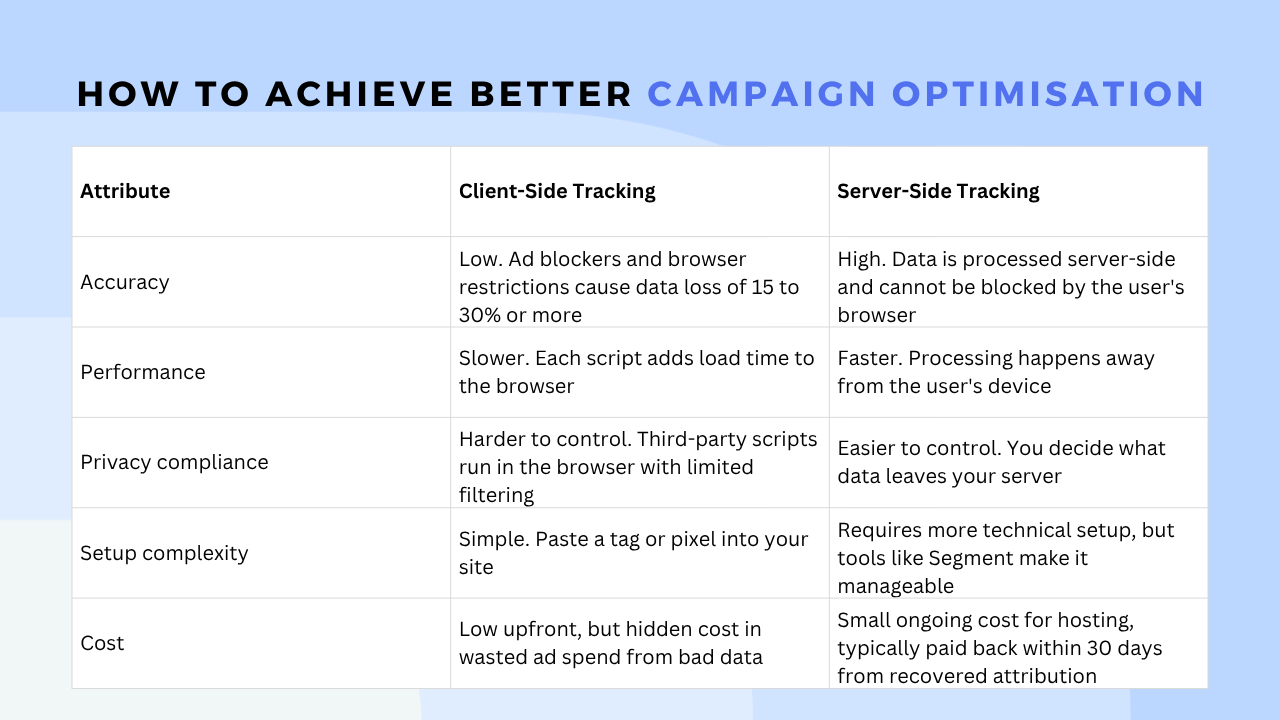
Client-side tracking runs in the user's browser using JavaScript and tracking scripts. You add a tag or pixel to your page. When someone visits, the browser loads the code and tries to transmit data to platforms like Google Analytics. But many things can go wrong. Ad blockers stop the code from running entirely. The data never leaves the browser at all.
Server-side tracking takes a different approach. Your site transmits data to your server first. The server handles the processing and transmits the information to your analytics platforms. The tracking happens away from the user's device, so it is far more stable and reliable.
5 Reasons You Need Server-Side Tracking
1. Better Data Accuracy and Bypassing Ad Blockers
Client-side tracking loses a significant amount of data. Ad blockers stop tracking scripts from running, which means purchases and page views go unrecorded. Ad blocker blocking rates range from 13% for B2C ecommerce to 41% for travel and 37% for B2B, depending on your audience. In 2024, $54 billion in publisher revenue was lost to ad blocking, affecting both ads and analytics. For ecommerce stores, that means real purchases disappearing from your reports.
With server-side tracking, your server sends data directly to the analytics platform. The user's device cannot block that communication. Server-side tracking improves data completeness by up to 30% compared to client-side methods. And for Shopify stores specifically, server-side tracking can achieve up to 98% tracking accuracy by processing data on a secure server instead of the user's browser.
2. Improved Website Performance
Every tracking pixel you add to your site makes it slower. The browser has to inject all those scripts before the user can interact with the page. When your store is slow, people leave without buying.
Moving tracking work to the server removes that burden from the browser. Your content loads faster. The user's device has less to do. A faster site leads to better conversion rates, especially on mobile where speed matters most. Your server captures 100% of conversions because it processes 100% of transactions, with no data loss from blocked pixels or failed script loads.
3. Stronger Privacy Compliance and Control
Privacy rules are getting stricter. GDPR, CCPA, and engine requirements like Meta's Conversions API all put pressure on how you handle user data. Server-side tracking gives you full control over what gets shared with third parties.
Your server can filter out sensitive customer details before sending anything to analytics solutions. You decide what leaves your system. The old client-side approach handed that control to external companies. Server-side tracking puts it back with you and makes it easier to stay compliant without losing the data you actually require.
4. Better Campaign Optimisation
Your Google Ads and Meta campaigns rely on accurate conversion data to improve their delivery. If data is missing, the algorithm has to guess which audiences to target. Guessing wastes budget.
One study found a 23% average ROAS lift after implementing server-side tracking with enhanced conversions. The improvement came not from strategy changes, but from feeding better data into existing campaigns. When engines like Google and Meta get cleaner signals about who is buying, they find more buyers like them. One retail advertiser saw a 20% increase in conversion attribution accuracy after switching from pixel-based tracking to Meta's Conversions API.
5. A More Reliable Customer Journey
If tracking scripts fail partway through a session, you lose sight of what the customer did. You need a setup that captures every step from first visit to purchase.
Server-side tracking gives you that complete picture. You can see exactly how a user moves from a blog post to a product page to a checkout. You know which emails bring people back. You know which ads actually drive sales, not just clicks. The data you see reflects what actually happened, not what the browser managed to send before something blocked it.
Tools to Help You Build Your Setup
Several apps make server-side tracking more accessible.
Segment is a customer data platform that collects events from your Shopify store and routes them to your analytics tools from a central server. It is a good option if you send data to multiple platforms.
RudderStack offers a similar service with an open source approach, giving you more control over your data pipeline and where it is hosted.
Shopify Functions allow developers to build custom logic directly on the Shopify backend, which is useful for stores with specific tracking requirements.
Meta Conversions API (CAPI) lets you send conversion events directly from your server to Meta, bypassing browser restrictions entirely. It works alongside the Meta Pixel for a more complete picture.
Snowplow is a more advanced option for stores that need granular, event-level data with full control over schema and storage.
Tealium is an enterprise-level tag management solution that includes server-side capabilities and is well suited to larger stores managing complex data flows.
A Simple Comparison
Frequently Asked Questions
Do I need a developer to set this up? Not necessarily. Platforms like Segment, Analyzify, and Stape are built to make server-side tracking accessible without deep technical knowledge. If you are on Shopify, there are apps in the Shopify App Store that handle much of the setup for you. For more complex configurations, a developer will help you move faster and avoid mistakes.
Will server-side tracking affect my page speed? Yes, but in a good way. Removing heavy scripts that have a tracking feature from your browser means pages load faster. The tracking work moves to your server, which does not affect what the user sees or how quickly they can interact with your store.
Is server-side tracking GDPR compliant? It can be, and it is easier to keep compliant than client-side tracking. Because you control the data on your server, you can filter out personal information before it reaches third-party platforms. You still need to follow consent rules, but server-side tracking gives you the tools to do that properly.
Accurate tracking needs a clean product feed too
Server-side tracking fixes what you measure. Your product feed decides which items Google puts in front of shoppers in the first place. If your campaigns now learn from reliable conversion data but the catalogue behind them still has missing attributes and no performance-based labels, you are still optimising on half the picture. The Clarmix feed app for Google Merchant Center covers the feed side: it audits the SKUs already in Google Merchant Center, flags setup errors in Performance Max and syncs product labels every day, so the cleaner conversion signals you set up above have better-organised products to work with.

How to Start
Here are the steps to get going.
- Review your current setup and check how much data you are losing daily by comparing your Shopify order count to what appears in your analytics.
- Choose a server-side tracking platform that fits your store size and technical comfort level.
- Create a test environment to confirm tracking is working correctly before going live.
- Set up your server to process event data properly.
- Connect your analytics platforms to receive information from the server.
- Run both client-side and server-side tracking in parallel for two weeks and compare the results.
- Monitor the system regularly to catch any issues early.
.png)
Browsers are becoming stricter every year. Apple and Google continue to change how they handle user tracking. Waiting means losing more data every month, and paying more for ads that optimise on incomplete information. The setup is more straightforward than it looks, and the tools available today make it accessible for most Shopify stores.
Join our monthly tips!
Get fresh insights on Google Shopping optimization delivered straight to your inbox.