What is a Multi-Client Account (MCA) on Merchant Center?
Learn what a Multi-Client Account (MCA) on Google Merchant Center is, how a parent account manages each subaccount, and how to request access.
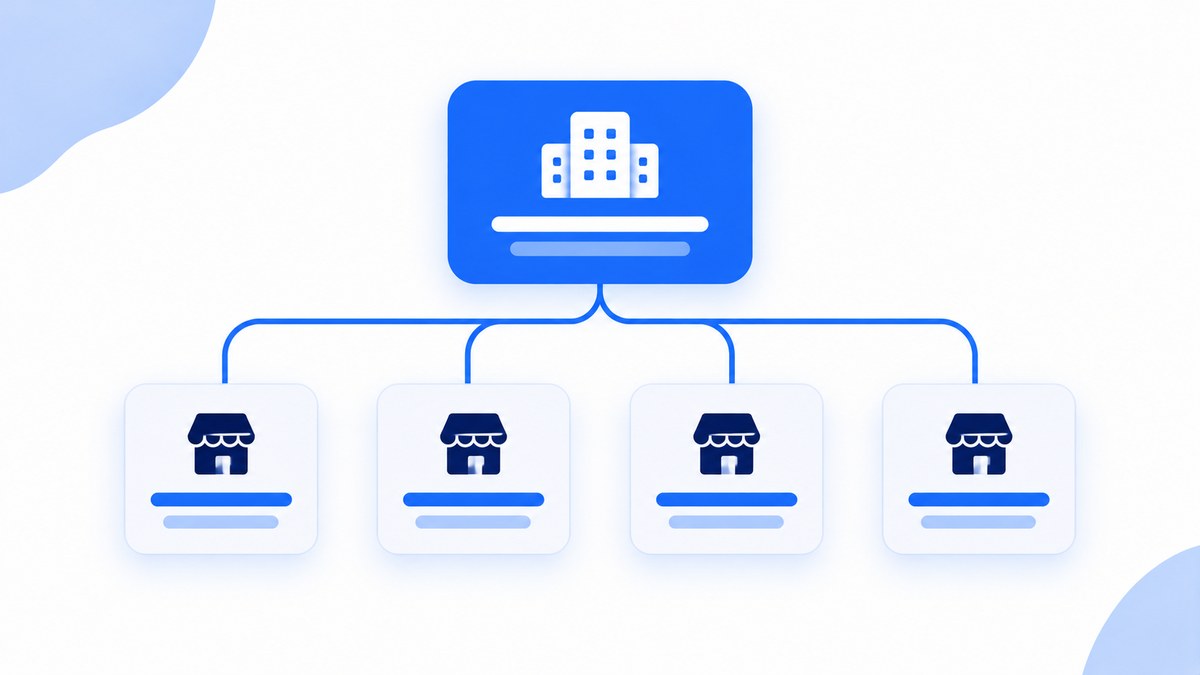
A Multi-Client Account (MCA) is a parent Merchant Center account that lets one company create, own, and manage multiple Google Merchant Center account profiles from one place. Each account underneath is a subaccount with its own products, feeds, and website URL. Google recommends the structure for marketplaces, merchants with multiple brands, international retailers, and channel partners. This guide explains how it works, who needs it, and the steps to set it up.
One update matters if you manage accounts in code: the Content API for Shopping reached its sunset on August 18, 2026, so the Merchant API is now the only option for programmatic account management. The details are below.
MCA vs. standalone account
A standalone Merchant Center account covers one business, one website, and one product feed. That works for a single online store on a single domain. Once you run several brands, several domains, or accounts for other merchants, you need a parent layer above them to manage multiple accounts without logging in and out.
If you only need access to several existing accounts, you do not need an MCA. Ask each account admin to add you as a user, as Google's setup page explains.
Who needs a Multi-Client Account?
- Marketplaces host many separate merchants that sell their products on one platform.
- Multi-brand merchants own several companies and need separate feeds, store names, and website URLs for each.
- International retailers sell one brand across several countries and domains and want consistent verification and settings in every market. If that is you, Clarmix can manage Google Shopping across multiple countries from one account.
- Channel partners list offers for merchants across channels such as marketplaces and comparison shopping services.
- Agency teams that run Merchant Center for several customers, although the newer agency tool described below is designed for that case.
Benefits of a parent MCA
The main benefit is control. Instead of juggling separate logins, one parent MCA gives your team a single place to see every individual subaccount, share settings, and review the status of each feed. Because the structure is simple and clear, a new team member can understand it in minutes, and it is easy to give the right people access to the right accounts.
It also helps with consistency. You can provide the same business information, shipping settings, and policies to each subaccount, and you can consider a shared naming convention so every customer-facing store name follows the same pattern. Reporting gets easier too, since the data for every country and brand sits under one umbrella. Keep in mind that each subaccount still has its own feed, so the data quality of each one still matters.
How an MCA works
The parent account is an administrative layer. Each subaccount keeps its own feeds, approval status, and website claim, and it inherits the parent's country. The parent usually verifies and claims the top-level domain, and subaccounts can then use any URL beneath it. This feature is what makes it practical to add a new brand or market without starting the verification process from scratch.
Limits depend on the MCA type. A standard MCA starts with 50 subaccounts. A marketplace MCA starts at 5,000 and can grow to a maximum of 800,000, according to Google's quota limits page. Google enforces quotas at both the subaccount and the MCA level.
Access needs care. Admin access is required for structural changes such as adding users or creating subaccounts. Moving a subaccount out of an MCA removes the inherited access of MCA-level users, and Channable's documentation advises adding a different email to the subaccount before any transfer so you do not lose access. Remove former partners as soon as a relationship ends. Note that a user's access can differ per subaccount, so review the list of users regularly and update each user's preferences and permissions when roles change. If an account problem escalates, our guide to Merchant Center suspensions and how to fix them covers recovery.
The Merchant API replaces the Content API
Google's deprecation page states that, since September 1, 2026, requests to the Content API without an active extension fail intermittently with an HTTP 410 error. Full decommissioning is scheduled for early 2027, and approved extensions do not run past it.
Any script that creates subaccounts, manages products, or updates inventory must now use the Merchant API. Start with Google's migration guide. If a platform partner runs your integration, Google says the partner manages the migration and you need to do nothing.
How to set up a Multi-Client Account
Before you start, make sure the account meets Google's requirements: you are an account admin, the account is not already an MCA or a subaccount, it has no account-level policy violation, and its website URL is verified and claimed. If the website is not verified yet, verify it first. Then follow these steps to complete the process:
- Sign in with a dedicated business Google account, not a personal one.
- In Merchant Center, open the Settings menu, then General, then the Account setup tab, and find Advanced account setup.
- Click Request Conversion, pick the options that describe your business, and submit the request.
- Wait to receive Google's confirmation email. It can take several days, so start early if a launch depends on it.
- Once approved, your current account becomes a subaccount of the new parent MCA. Save the MCA's Merchant Center ID, because you need it to link accounts and contact support.
- Create more subaccounts in the interface or through the Merchant API, and add each company or brand with its own website URL.
Avoid putting several websites with similar content under one subaccount, since Google warns this can lead to account disapproval.
MCA vs. Merchant Center for Agencies
Google introduced Merchant Center for Agencies on March 11, 2026 as a command center for managing a whole client portfolio, and made it generally available worldwide on May 11, 2026. It is built for an agency that manages accounts on behalf of other businesses. A retailer or marketplace managing its own stores still uses the MCA setup above.
Frequently asked questions
Can I add an existing Merchant Center account to my MCA?
The conversion flow turns your own account into a subaccount of the new MCA. To bring in other existing accounts, use the account relationships described in Google's Merchant API guide.
What happens to Content API integrations?
They are being phased out. Requests have been failing intermittently since September 1, 2026 unless you hold an approved extension. Migrate to the Merchant API.
What access level manages subaccounts?
Admin access. Standard users cannot make structural changes such as modifying users or creating subaccounts.
Can an account be both an MCA and a subaccount?
No. An account that is already an MCA, or a subaccount in an existing MCA, is not eligible for conversion.
Final thoughts
An MCA gives marketplaces, agencies, and multi-brand retailers one parent account for settings, users, and reporting across every subaccount. Once the structure is in place, improve each subaccount's feed with our guide to Google Shopping feed optimization.
Sources
- Request an advanced account setup, Google Merchant Center Help
- Quota limits, Google Merchant Center Help
- Deprecation and sunset, Content API for Shopping, Google for Developers
- Migrate from Content API for Shopping to Merchant API, Google for Developers
- Account relationships, Merchant API, Google for Developers
- Introducing Merchant Center for Agencies, Google Merchant Center Help
- Merchant Center for Agencies available globally, Google Merchant Center Help
- Google Merchant Center account types, Channable Help Center
Join our monthly tips!
Get fresh insights on Google Shopping optimization delivered straight to your inbox.