
How Clarmix turned static PMax campaigns into SKU-level segmentation for a 60,000-product catalog
.png)
We rebuilt 3 static PMax campaigns into dynamic performance labels, shifting budget away from wasteful SKUs to unlock hidden catalog potential and drive Shopping growth.
Founded in 2018 in Bordeaux by Olivier Perron, Hello RSE is a French e-commerce platform operating within the Social and Solidarity Economy (SSE) and sustainable IT sectors. Led by its founder alongside a team dedicated to eco-responsible sourcing, the company distributes about 60,000 IT and audiovisual products (both new and refurbished) tailored for private businesses and public sector procurement. Its core mission is to streamline responsible tech procurement by integrating transparent environmental and social impact metrics (eco-index, carbon footprint, and ADEME criteria) for every item while prioritizing short supply chains, local resellers, and competitive pricing.
%20(1).png)
The account before Clarmix
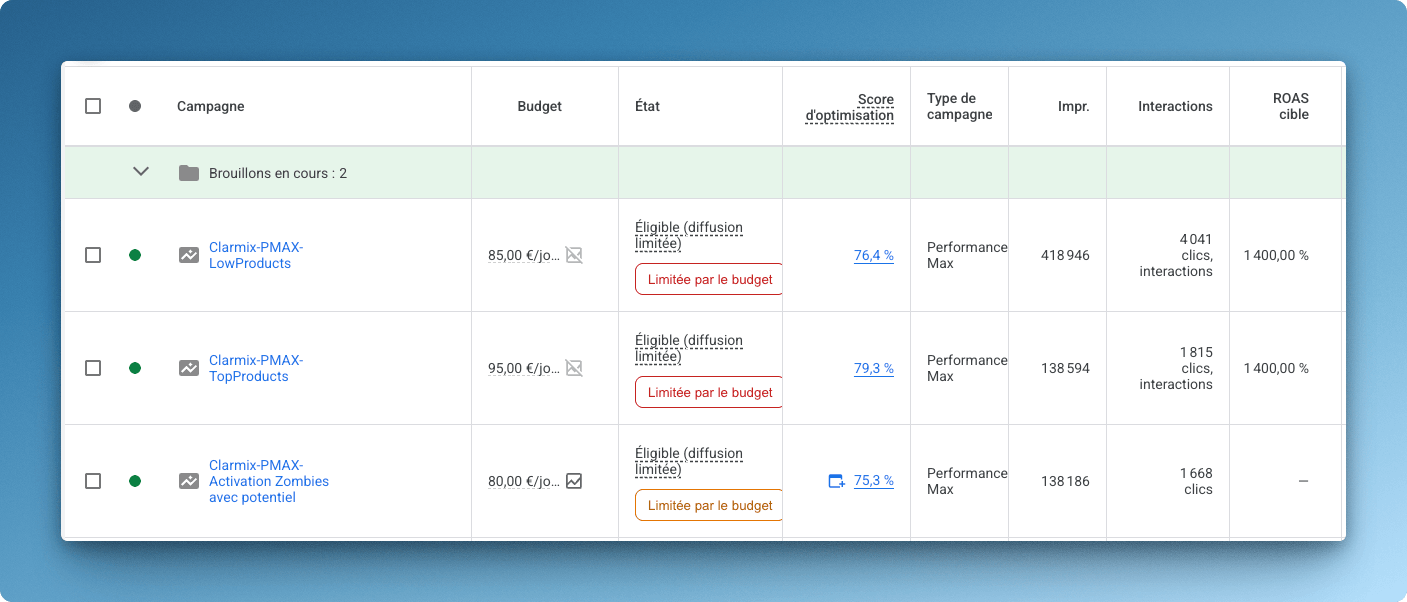
Before Clarmix, the account was structured around 3 PMax campaigns based on static product groups (asset groups). That setup was simple, but it had a clear limit: products were grouped by catalog logic, not by performance.
A product could become profitable, costly, or inactive without moving to the right campaign. Budget allocation stayed fixed while SKU performance changed.
For a catalog of this size, that creates three problems:
1. Profitable products do not always receive enough budget.
2. Low-performing SKUs can continue spending.
3. Zombie products stay invisible, even when some of them have commercial potential.
Clarmix replaced this setup with dynamic SKU-level segmentation.
Instead of asking Google Ads to treat large product groups the same way, each SKU receives a daily performance label. These labels are pushed to Google Merchant Center through a supplemental feed and synced back into Google Ads.
This is the role of Labelizer: classify products based on real performance, then make that classification actionable inside Shopping and PMax campaigns.
Step 1: What we changed right at the beginning
The first step was to create a custom label structure with the client.
We imported a spreadsheet into Google Merchant Center through a supplemental feed and created three business-specific custom labels:
- Custom label 0: "Marketplace Potential" - SKU with impressions on the marketplace they sell their products on (via API)
- Custom label 1: "Good Margins" - Products with good margins (manually, via a Spreadsheet)
- Custom label 2: "Conversion Stock" - Products converting on their site and currently in stock (via API)
Then we used custom label 3 to send Clarmix performance labels to Google Ads every day. These labels included High Potential, Low Potential, Costly, Zero Conversion, Zombies
This allowed products to move from one campaign to another automatically as their performance changed.
A product that became profitable could enter a higher-priority campaign. A costly product could be isolated or deprioritized. A zombie SKU could be reviewed through additional business signals before being reactivated.
.jpeg)
Step 2: We increased the volume of the PMax_Top campaign
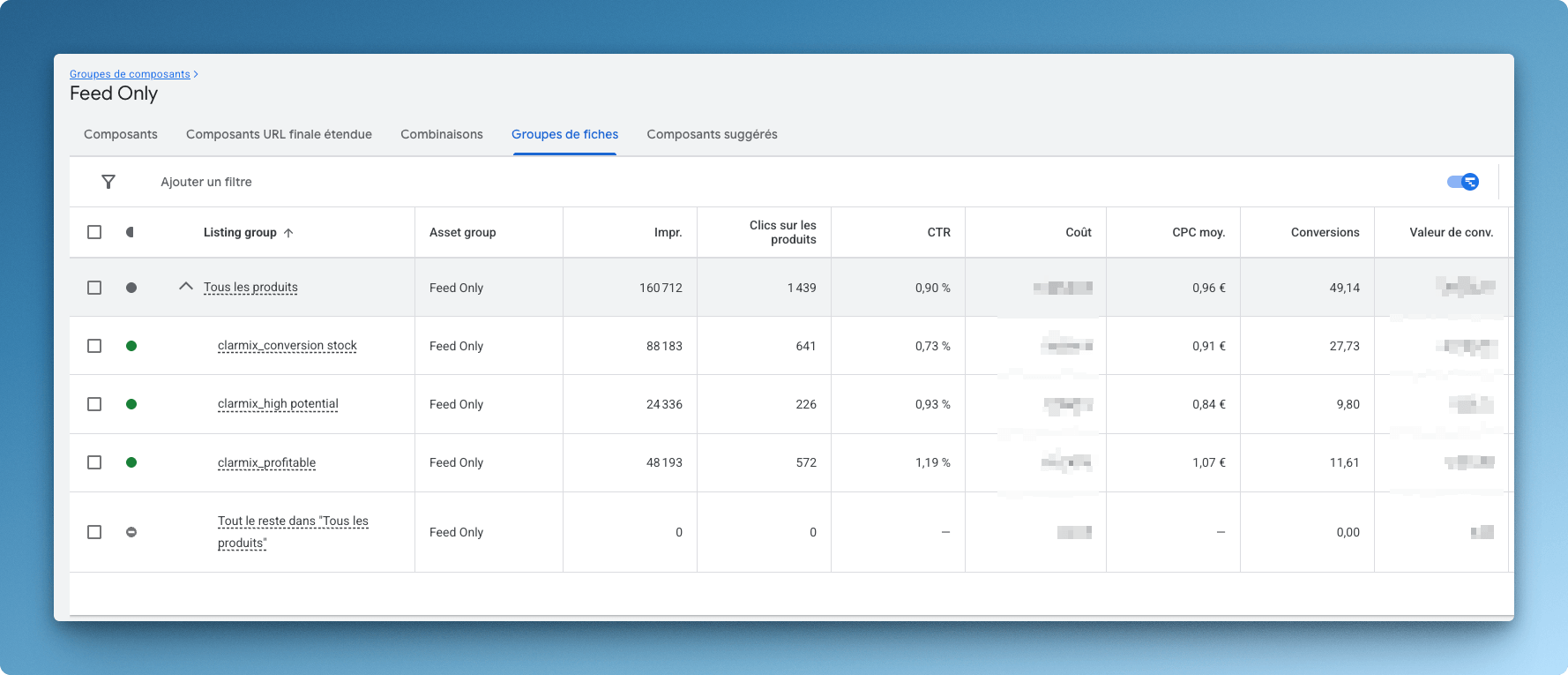
The Top PMax campaign was initially too narrow. Only 90 products were included in the default Clarmix labels “Profitable” and “High Potential.”
That meant the campaign was focused on proven Google Ads winners, but it missed products with strong conversion signals outside Google Ads.
So we created a new Clarmix label: Conversion Stock.
This label included products that:
- Converted well on the website (at least 3 conversions these last 60 days)
- Were currently in stock
- Had not necessarily generated their conversions from Google Ads. These conversions could come from SEO, affiliates, marketplaces, or other acquisition channels.
By adding this label, we increased the number of SKUs in the PMax Top campaign from 90 to 350.
After two weeks, the campaign had enough traction to double its daily budget.
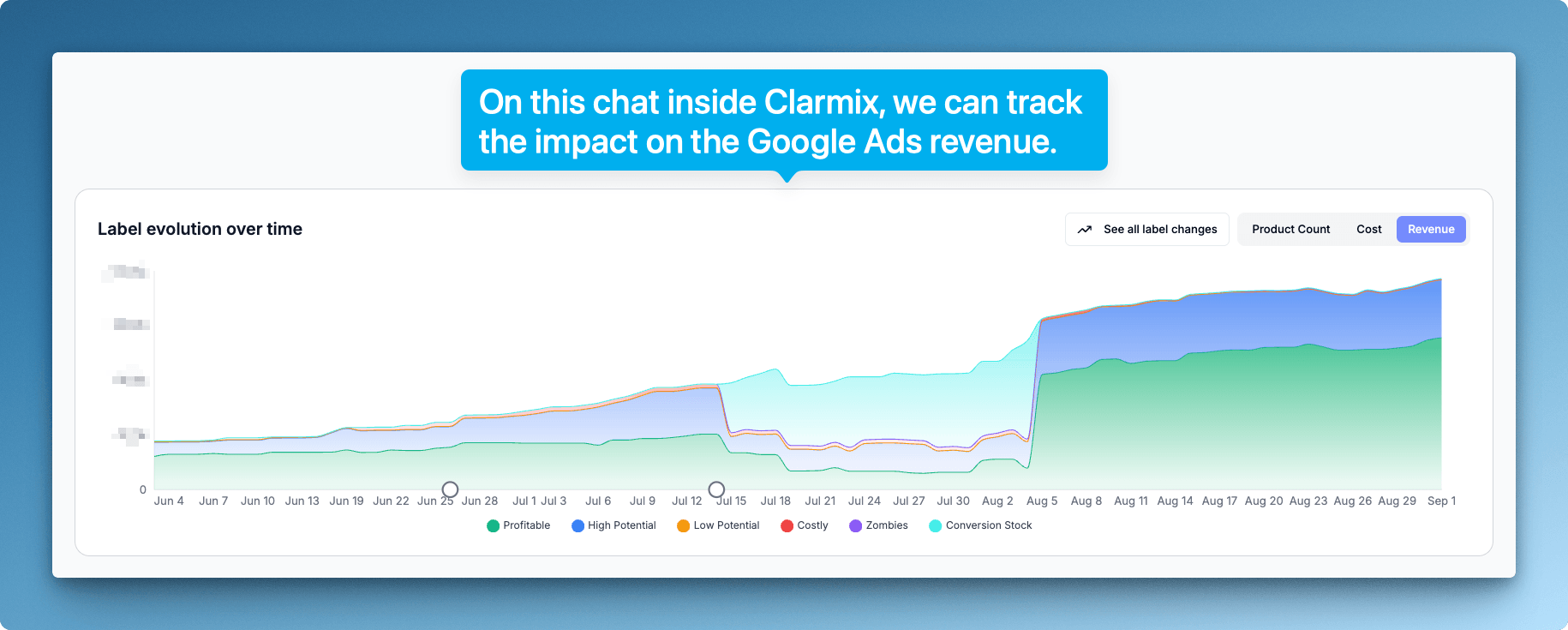
This resulted in a significant increase in revenue generated from Google Ads. We decided to scale the campaign budget to invest more in these profitable products, generating high ROAS.
The image below shows the evolution of these labels on revenue from Google Ads over the last 90 days. On the chart, we can clearly see how revenue is increasing, almost reaching 4X in 90 days.
This is the direct result of smart, dynamic product segmentation inside Google Ads shopping campaigns.
Step 3: We shortlisted zombie products instead of pushing the whole catalog
The catalog contained around 60,000 products, and about 90 percent were classified as zombies.
In Clarmix, zombie products are active in Google Ads but receive no spend or traffic. On large catalogs, they often represent the majority of SKUs.
The wrong move would have been to reactivate every zombie product in a dedicated PMax campaign. That would have spread budget across thousands of products with no clear signal.
Instead, we created a new label: Zombies Potential. This label selected zombie products that matched two conditions:
- They received clicks on the Marketplace, imported automatically through API (Custom Label 1)
-They had good margins, imported manually through spreadsheet data (Custom Label 2)
- Products converting on their site and currently in stock, imported automatically through API(Custom Label 3)
This gave us a smaller, more qualified group of dormant products to test.
The logic was simple: if a product gets attention on a marketplace and has enough margin to support paid acquisition, it deserves a controlled test in Google Shopping.

Step 4: We cleaned and enriched the product feed for Google Shopping and GEO
Campaign segmentation was only one part of the work. The second part was feed quality.
For Google Shopping, PMax, and AI-driven discovery, the product feed needs to be precise, complete, and mapped correctly.
We started with the basics: products had to be listed correctly, prices including tax had to match the website, product data had to avoid Merchant Center flags, and Google categories had to reach the most precise taxonomy node.
For around 15,000 SKUs, the Google categories were not mapped to the final level of Google’s official taxonomy. We improved that mapping.
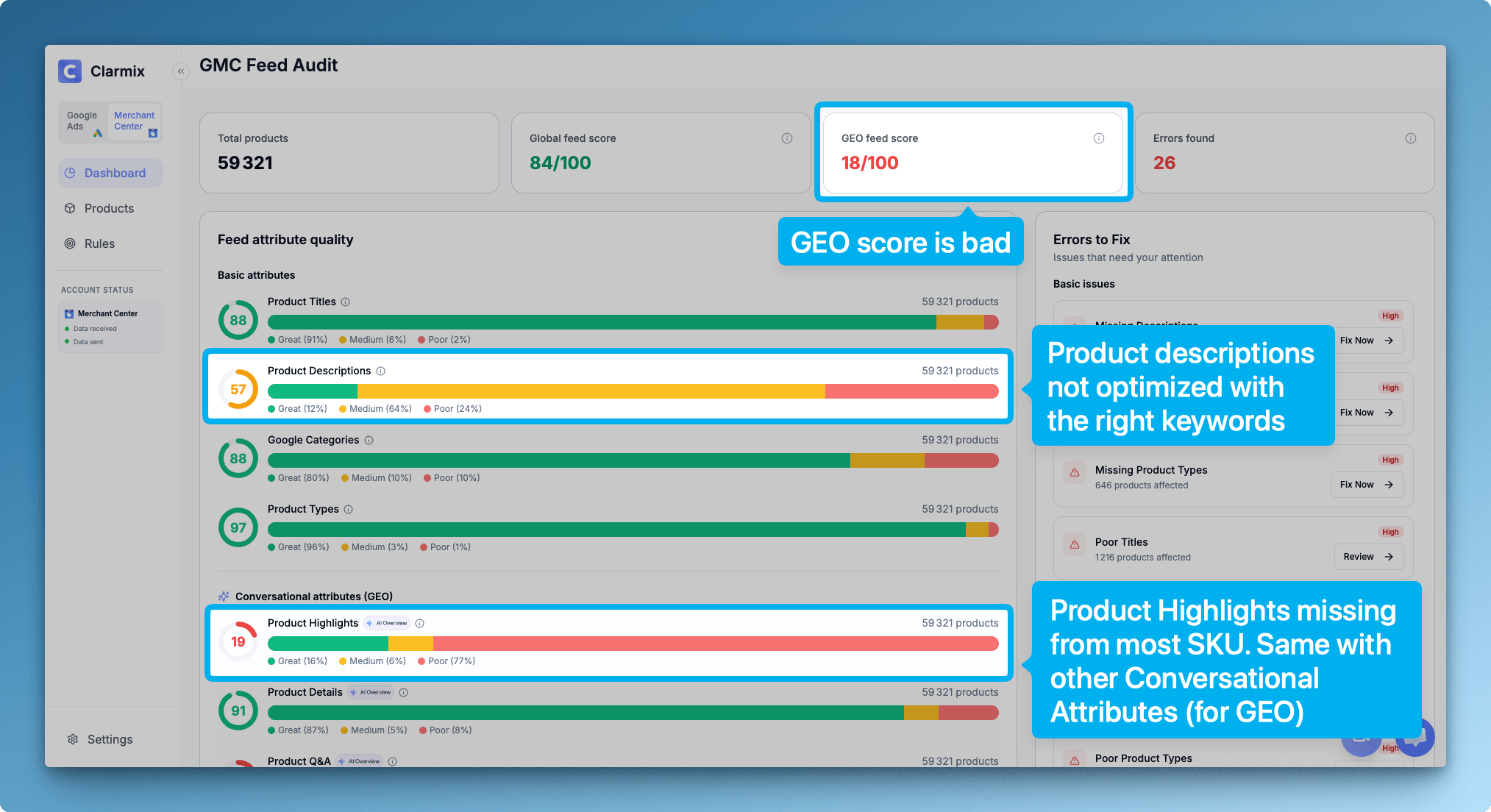
Then we generated conversational and structured attributes for the full 60,000-product catalog.
These included:
- [product_highlight]: 6 to 10 bullet points for AI-generated summaries
- [product_detail]: 3 to 10 non-standard technical characteristics per SKU
- [question_and_answer]: 2 to 3 real product Q&A pairs
- [document_link]: at least 1 PDF file per category
- [item_group_id]: 1 parent code applied to all variants
- [related_product]: 3 to 5 complementary product IDs
- [variant_option]: 1 or 2 words per variant, such as material or color
- [popularity_rank]: a dynamic score from 1 to 100 per SKU
Finally, we mapped these attributes from the client’s product source of truth to Google Merchant Center. That means new incoming products can be enriched automatically instead of being handled manually.
This is where Clarmix works both as a data feed tool and as product feed enrichment software for Google Shopping, GEO, and AI overview visibility.
What changed after Clarmix
After implementing Clarmix, the account moved from static segmentation to daily SKU-level segmentation.
The PMax Top campaign expanded from 90 to 350 qualified SKUs after adding Conversion Stock.
The daily budget was doubled after two weeks.
629 “zombie” products have been reactivated.
Note: They were not reactivated indiscriminately. They were filtered based on market demand and margin signals. See image below.

The feed was cleaned, mapped more precisely, and enriched with GEO-ready attributes.
The setup also created a scalable workflow for new products entering the catalog.
Instead of auditing and updating labels manually, the client now has a dynamic system connected to Google Merchant Center and Google Ads.
How the Labelizer setup works inside Clarmix
The workflow is simple and can be done by anyone!
1. Connect Google Ads and Google Merchant Center to Clarmix through Google’s official API.
2. Set the target ROAS, cost per conversion, time range, and optional conversion lag.
3. Let Clarmix classify products into default or custom performance labels.
4. Generate an XML supplemental feed.
5. Choose an available custom label field in Google Merchant Center.
6. Send the labels to Merchant Center.
7. Use these labels in Google Ads listing groups.
8. Let products move between campaigns as labels update daily.
The primary product feed stays untouched. Clarmix comes on top through a supplemental feed. That matters if the client already uses a feed manager, CMS, or product feed management tool such as Shopify, WooCommerce, Magento, Channable, or Lengow.
Better segmentation means better budget allocation
PMax decides which products to push, but it does not always prioritize the SKUs that match your profitability targets. With SKU-level segmentation, the account structure becomes more aligned with the client’s P&L.
Profitable and High Potential products can receive more budget. Costly and Zero Conversion products can be isolated. Zombie products can be tested only when they show external demand or margin potential.
The goal is not to over-control PMax. The goal is to give it a cleaner product structure and better signals.
This setup is a good fit if you manage a large Google Shopping catalog
Clarmix is especially useful if:
- You spend more than 3,000 dollars or euros per month on Google Ads
- You manage more than 500 SKUs
- You run Shopping or PMax campaigns
- You need to isolate costly products
- You want to scale profitable SKUs faster
- You already use a feed manager but need a Google Ads performance layer
- You want to improve your product feed for GEO and AI overview visibility
Want to see how your Google Shopping budget is allocated?
Clarmix audits your Google Ads and Merchant Center account, then shows how your spend is split across profitable, high potential, costly, zero conversion, and zombie products.
The audit is free.
When you want to send labels or enriched attributes to Merchant Center, you can activate the paid version and generate the supplemental feed.
Start with the audit. You will see which SKUs deserve more budget, which ones are wasting spend, and which zombie products may be worth testing.

A quick FAQ to end
1. Does Clarmix replace my existing product feed management software?
If you only sell through your website and Google Shopping, Clarmix can replace a generic feed manager for that use case. If you sell across multiple channels, Clarmix usually works on top of your current feed manager as a Google Shopping optimization layer.
2. Does Clarmix modify my primary Merchant Center feed?
No. Clarmix creates a supplemental feed in Google Merchant Center. Your primary feed remains untouched and can still be managed by your CMS or feed manager.
3. How often are product labels updated?
Clarmix syncs once per day, early in the morning. Merchant Center receives updated labels, then sends them to Google Ads. You can also force-sync via a button inside the Clarmix interface.
4. What is SKU-level segmentation?
SKU-level segmentation means each product is classified based on its own performance, not only by category or product group. In Clarmix, each SKU can receive labels such as Profitable, High Potential, Costly, Zero Conversion, or Zombie.
5. What is a zombie product?
A zombie product is active in the catalog but receives no meaningful Google Ads traffic.
In large catalogs, zombie products can represent most of the SKUs. Some should stay inactive. Others may be future bestsellers if they show signals such as marketplace clicks, good margins, or strong organic demand.
6. Is Clarmix a Channable or Lengow alternative?
For Google Shopping and PMax optimization, yes. Clarmix is more specialized in Google Ads performance labeling, Merchant Center enrichment, and SKU-level campaign segmentation. Channable is broader and more focused on multi-channel feed management.
7. Is Clarmix an alternative to Product Hero?
Yes. Clarmix offers default performance labels like Product Hero, but also lets teams create custom labels using business-specific rules such as margin, stock, marketplace demand, category, or availability.
8. What is product feed enrichment?
Product feed enrichment means improving product attributes before sending them to Merchant Center. This can include better titles, descriptions, product highlights, product details, Q&A, related products, item group IDs, and category mapping.
9. Why does Google Shopping feed optimisation matter?
Google Shopping depends heavily on product feed quality. If product data is incomplete, poorly mapped, or not aligned with search intent, Google has fewer signals to match products with the right queries and audiences.
Join our monthly tips!
Get fresh insights on Google Shopping optimization delivered straight to your inbox.
