Custom labels in Demand Gen: how to segment your products
Since June 2026, Demand Gen can filter products by Merchant Center custom labels. Steps, label strategies by margin, performance and season, and the limits.
Demand Gen campaigns can now use your Merchant Center custom labels, custom_label_0 to custom_label_4, to choose which products each ad group shows and to report and bid by product group. Google added Demand Gen to the custom label specification in late June 2026 (PPC Land, June 28, 2026), so the labels you already built for Shopping and Performance Max now work in YouTube, Discover and Gmail product ads too. In practice: create the campaign with your feed, then subdivide each ad group's product group by custom label and give each segment its own creative and bid target.
This guide assumes you already run Demand Gen or Performance Max with a product feed. If custom labels are new to you, start with what a labelizer is and how custom labels work.
What changed for custom labels in Demand Gen?
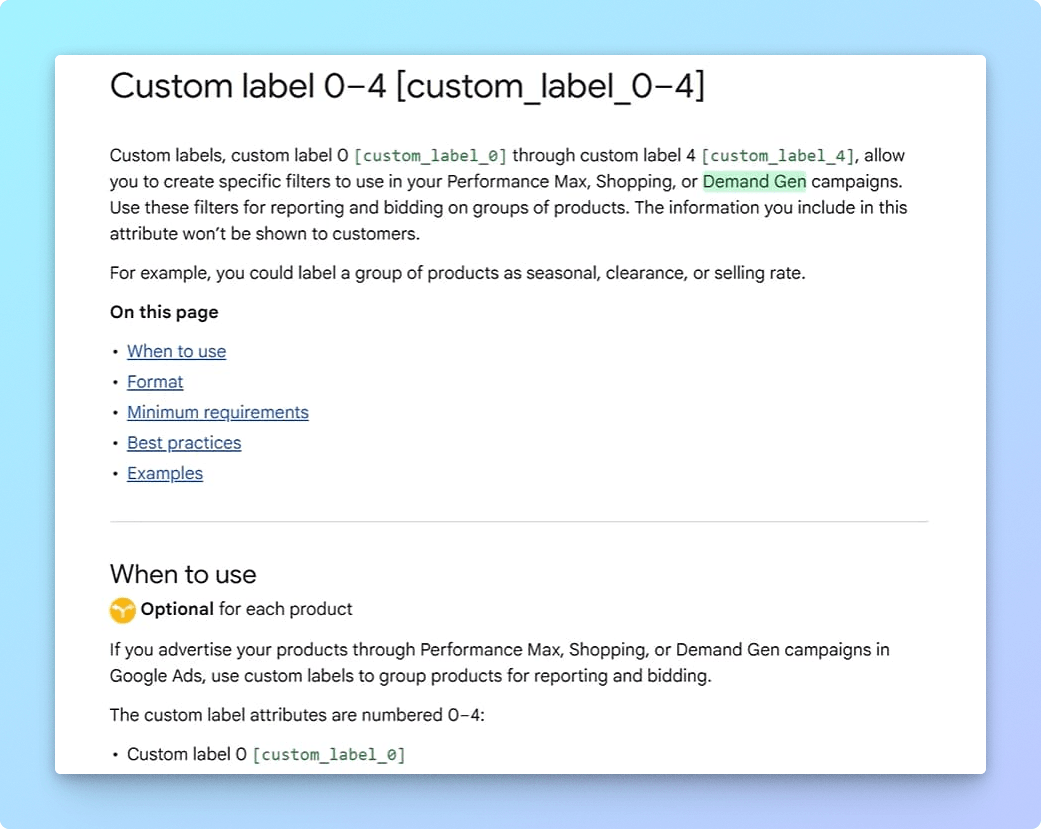
Until June 2026, Google's custom label documentation named only Performance Max and Shopping campaigns. The Merchant Center help page now says the five custom label attributes are used for reporting and bidding on groups of products in Performance Max, Shopping or Demand Gen campaigns (Google Merchant Center Help). The label rules themselves did not change:
- Five attributes,
custom_label_0tocustom_label_4, one value per product per attribute. - Values of 1 to 100 characters, not case sensitive, never shown to shoppers.
- Up to 1,000 unique values per attribute across the account. Labels past that limit are ignored for reporting and bidding.
What is new is the use. Demand Gen already let you show products from a feed, but segmenting them meant filtering on brand, product type or item ID. Those attributes describe what a product is. Custom labels can describe how it performs, what it earns or when it sells, which is what you need to decide where Demand Gen budget goes.
How do you filter Demand Gen products by custom label?
Product filtering happens in two places, and only the second one combines attributes (Google Ads Help, product feeds in Demand Gen):
- Check the prerequisites. Link Merchant Center to Google Ads and enable Shopping ads as a marketing method in Merchant Center. New product feeds can take up to 3 days to be approved for Demand Gen.
- Create the campaign with a product feed. Turn on "Run a product feed campaign", pick the Merchant Center account and one feed label (or all available feeds). A campaign can use only one feed label.
- Keep the build-time filter simple. During campaign construction, the product filter supports one filter type with OR logic, for example a list of product types. Do not try to build your segmentation here.
- Subdivide after the build. Open the Ad groups tab, then the product groups of the ad group, and add a custom label subdivision. This post-construction filtering uses AND logic, so you can combine, for example, product type and
custom_label_0. - Repeat per ad group. Each ad group gets the slice of the catalog that matches its creative: one ad group per label value is the cleanest setup to read.
If you manage campaigns through the API, the same logic applies: products are restricted at ad group level with listing group criteria built as a tree, "just as with Shopping campaigns", starting from a root node (Google Ads API documentation).
Which custom labels work best in Demand Gen?
Demand Gen is not Shopping. It reaches people on YouTube (including Shorts), Discover, Gmail, Maps and the Google Display Network (About Demand Gen campaigns) before they search for your product. So the useful question for each label is: which products deserve to be shown to people who are not looking for them yet?
Pick one attribute per purpose and keep it stable across campaign types. If custom_label_0 means performance in your Shopping and PMax campaigns, it should mean performance in Demand Gen too, so reports line up. Our guide to custom label strategies by catalog size covers how to assign the five slots.
Performance labels only help if they stay current: a product that was profitable last month may be a zombie today. Clarmix's product labelization recalculates labels daily, sorting each SKU into Profitable, High Potential, Low Potential, Costly, Zero Conversion or Zombies based on clicks, target ROAS and cost per conversion, and sends them to Merchant Center through a supplemental feed. Because Demand Gen now reads the same custom labels, a Demand Gen ad group filtered on a performance label follows those daily changes without anyone editing the product groups. For margin and stock labels built from Shopify data, see how to segment Shopify products by margin.
How should you structure ad groups and bidding?
Demand Gen sets bidding at campaign level, with goals for clicks, conversions or conversion value (Google Ads Help). That shapes how far you split:
- Different bid targets need different campaigns. If your margin_high products can accept a lower target ROAS than margin_low ones, put each band in its own campaign. Ad groups inside one campaign share its bid strategy.
- Different creative needs different ad groups. Use ad groups to pair a label value with matching assets: a video for the winter collection, images for the gift guide.
- Keep enough products in each group. A product feed needs at least 4 eligible products and Google recommends 50 (Troubleshoot product feeds for Demand Gen). A label value with only a handful of SKUs is better merged with a neighbor.
- Budget for the target. Google recommends a daily budget of at least 10 times your target CPA, and the platform minimum is $5 per day (About Demand Gen campaigns). Splitting one budget into five thin campaigns slows learning in all of them.
Ad formats are the same whatever the filter: image and products ads, video and products ads, or products-only ads, with products rendered as a carousel (Google Ads Help). For video planning, see our guide to YouTube ads for e-commerce.
How does this compare with Performance Max listing groups?
The labels are shared, but the campaigns use them differently.
PMax listing groups are documented in Google Ads Help, which allows up to 1,000 listing groups per asset group and recommends custom labels to group products.
A practical split: let Performance Max cover your proven products where intent is high, and use Demand Gen with label filters to introduce high-margin or high-potential products to new audiences. If both run on the same products, check how Google prioritizes channels in our guide to channel prioritization and budget allocation.
What limits and errors should you watch for?
- "Feed doesn't have enough eligible products". This appears when a filter leaves fewer than 4 eligible products, often after a label subdivision that is too narrow (Google Ads Help).
- The 1,000-value cap. Labels with unique values per product, such as SKU-level scores, hit the account-wide limit quickly. Use bands, not raw numbers.
- Regional availability and pricing feeds. Demand Gen does not support them, so stores using regional pricing need one of Google's workarounds before label filters matter.
- Label changes and learning. A product that moves from one label value to another leaves one ad group and enters another. With daily performance labels this is the point, but keep each ad group large enough that a few moves do not empty it.
- Alcohol. Advertisers promoting alcohol cannot use product feeds in Demand Gen (Google Ads Help).
Frequently asked questions
Do I need new custom labels for Demand Gen?
No. Demand Gen reads the same custom_label_0 to custom_label_4 values already in your Merchant Center feed. You may want to fill an unused slot with a label built for prospecting, such as margin band, if your current labels only describe search performance.
Can I filter by custom label when I create the campaign?
The build-time filter supports one filter type with OR logic. Google's help page points to the post-construction product group filter, in the Ad groups tab, for custom label subdivisions combined with other attributes.
Should Demand Gen use the same performance labels as Shopping?
Use the same definitions, but not always the same choices. A product labeled Zero Conversion in Shopping gets impressions without sales from search traffic; putting it in front of people who were not searching is unlikely to fix that. High-potential and high-margin products are the better candidates for Demand Gen tests.
Does the custom label change affect Performance Max?
No. Performance Max and Shopping kept their existing custom label support. The June 2026 update added Demand Gen to the list of campaign types that can use the labels.
Sources
- Custom label 0–4 [custom_label_0–4], Google Merchant Center Help
- Google quietly unlocks custom labels for Demand Gen campaigns, PPC Land, June 28, 2026
- Use a product feed to show your products in Demand Gen campaigns, Google Ads Help
- Troubleshoot product feeds for Demand Gen, Google Ads Help
- About Demand Gen campaigns, Google Ads Help
- Demand Gen campaigns with product feeds, Google Ads API
- Manage a Performance Max campaign with listing groups, Google Ads Help
Cover photo by Angèle Kamp on Unsplash.
Join our monthly tips!
Get fresh insights on Google Shopping optimization delivered straight to your inbox.