How to segment Shopify products in Google Shopping by margin

A practical guide for PPC consultants: segment Shopify products by profit margin, unit cost and metafields, then use custom labels in PMax and Shopping.
To segment Shopify products in Google Shopping by profit margin, take each product's price and cost per item from Shopify, work out its margin, combine it with the product's Google Ads and Merchant Center data, and write the result into a custom label such as custom_label_0. You then split your Performance Max listing groups or Shopping campaigns by that label and give each margin tier its own target. Metafields, like season or product line, work the same way and add segments that ROAS alone can't show.
This guide is for PPC consultants and in-house teams running Google Ads for Shopify stores. It covers which Shopify data is worth bringing into Google Ads, how to build margin and metafield segments, how to get them into Merchant Center, and how to use them in campaigns.
Why does ROAS alone send budget to the wrong Shopify products?
Google Ads bids on the conversion value you report, which for most Shopify stores is revenue. Two products with the same ROAS can leave very different profit once the cost of the product is counted, and Google Ads can't see that cost unless you send it.
The numbers are illustrative, but the pattern is common: at the same ROAS, Product A makes money and Product B only covers its ads. If both sit in the same listing group with the same target, Google Ads treats them the same. Segmenting by margin lets you set a different target for each tier, or push spend toward the products that can afford it.
Which Shopify data is worth bringing into Google Ads?
Shopify already stores most of what you need. In the product editor you can add a price, a compare-at price and a cost per item, which Shopify describes as a way to track operating costs and profits (Shopify Help: Product prices). Metafields let you add your own fields to products, such as care instructions or dimensions (Shopify Help: Metafields). Very little of this reaches Merchant Center on its own.
The value comes from combining this with what Google already knows. Google Ads has the clicks, cost and conversions for each product, and Merchant Center has its status and attributes. A segment like "high margin, many clicks, no conversions in 30 days" needs all three sources.
How do you segment Shopify products by margin?
- Calculate the margin of each SKU. Margin = (price - cost per item) / price. Work at variant level when variants have different costs.
- Fill the gaps first. Products without a cost per item end up in no tier. List them and complete the cost in Shopify before you build campaigns on the segment.
- Pick 3 tiers, not 10. For example below 25%, 25% to 50% and above 50%. Each tier needs enough conversions for its campaign or asset group to learn.
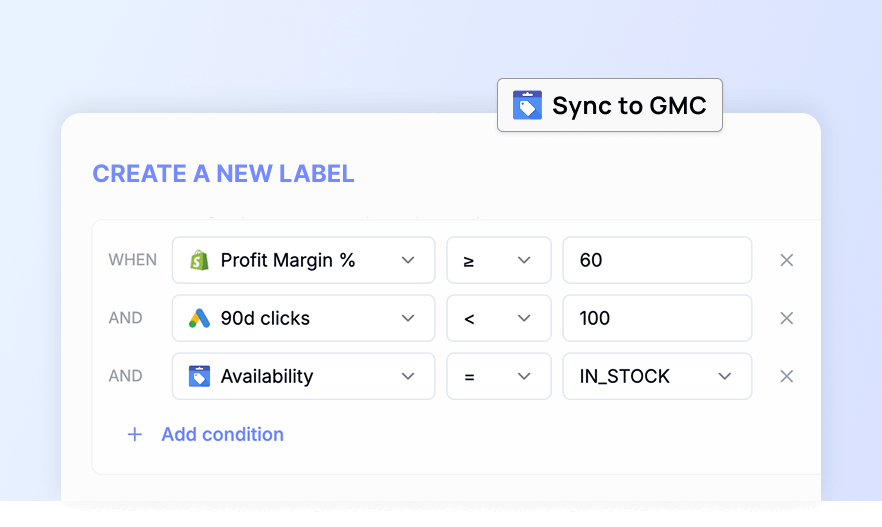
- Cross the tier with performance. A high-margin product with no conversions is not a winner yet. Combine the margin tier with clicks, cost and conversions so you can tell high-margin sellers from high-margin products Google barely shows.
- Write the result into a custom label and refresh it as costs, prices and performance change.
If you're preparing for a sale, the same logic applies to choosing which products to push. Our guide to picking products for Black Friday by profit walks through break-even ROAS per group.
How do you use Shopify metafields to segment products?
Metafields hold the business context your feed usually lacks. A few segments PPC consultants use often:
- Season or collection: a metafield like "Season: Winter" becomes a label you can raise in October and lower in March.
- Product line or supplier: group products whose margins or stock depend on the same supplier.
- Hero or new products: a metafield the merchandising team already maintains can drive a dedicated asset group.
The rule is the same as for margin: only segment on a metafield if it is filled in for most of the catalog and someone keeps it up to date. We cover more uses in 5 reasons to use metafields in your Google Shopping feed.
How do you get the segments into Merchant Center?
Segments reach Google Ads through custom labels. Merchant Center gives you five, custom_label_0 to custom_label_4. Each product takes one value per label, values can be 1 to 100 characters, and you can create up to 1,000 unique values per label attribute across the account. The values are not shown to shoppers (Merchant Center Help: Custom label 0-4).
A simple plan for a Shopify store:
custom_label_0: margin tier (low, mid, high)custom_label_1: season or collection from a metafieldcustom_label_2: performance segment (for example bestseller, no conversions)
Send the labels through a supplemental feed rather than editing the primary feed, so the labels can change daily without touching the product data your Shopify integration sends.
The Clarmix Shopify app is built for this step. It combines your Shopify store, Google Ads and Merchant Center data, so you can filter and segment products on Shopify fields such as metafields, unit cost and margin, alongside their ad performance. The resulting labels are sent to Merchant Center as custom labels through a supplemental feed, and the Product Labelizer refreshes them daily.
How do you use margin segments in Performance Max and Shopping?
In Performance Max, listing groups decide which products an asset group shows, and you can subdivide them by custom label, brand, item ID, product type or category. Google allows up to 1,000 listing groups per asset group and recommends custom labels to group items rather than going above that (Google Ads Help: Performance Max listing groups).
Two common structures:
- One campaign per margin tier. Each campaign gets its own target ROAS and budget, so high-margin products can run at a lower ROAS target. Use it when each tier has enough conversions to stand alone.
- One campaign, asset groups by tier. Simpler to manage on small catalogs, but budget is shared, so the tiers compete for it.
Exclude products that lose money at any realistic ROAS, and check they don't reappear in another campaign. If you run Shopping and Performance Max side by side, read our guide to Google Ads channel prioritization before splitting.
What mistakes should you avoid when segmenting by margin?
- Segmenting on incomplete costs. If a third of the catalog has no cost per item, the "high margin" tier is really "products someone remembered to fill in".
- Too many small segments. A tier with a handful of conversions a month can't give a campaign enough data to learn. Merge tiers before you split budgets.
- Static labels. Costs, prices and promotions change. A label set once in spring is wrong by Black Friday, so refresh labels on a schedule.
- Margin without performance. Margin tells you what a sale is worth, not whether Google can sell the product. Keep a performance label next to the margin label, as covered in our custom labels strategy for Shopify stores.
Should you use margin labels or report profit with COGS?
Both, for different jobs. Merchant Center's cost_of_goods_sold attribute lets Google estimate gross profit when you report conversions with cart data. Google says the value is for reporting and does not need to be exact, and it is required for automated discounts and dynamic promotions (Merchant Center Help: Cost of goods sold).
Margin labels act on structure: they decide which products sit together and which target they get. COGS reporting shows you profit after the fact. If Shopify's cost per item is filled in, you can use the same number for both.
Frequently asked questions
1. Where is the cost per item in Shopify?
It is in the pricing section of the product editor, next to the price and compare-at price. Shopify uses it to help you track costs and profit per product.
2. How many custom labels can I use in Merchant Center?
Five, from custom_label_0 to custom_label_4, with one value per product for each and up to 1,000 unique values per label across the account.
3. Can Performance Max listing groups use custom labels?
Yes. Custom labels are one of the attributes you can subdivide listing groups by, along with brand, item ID, product type and category.
4. Do shoppers see custom labels?
No. Google says the values in custom labels are not shown to customers, so labels like "low margin" are safe to use.
5. Should I send cost_of_goods_sold if I already use margin labels?
It helps. Labels change how campaigns are built, while cost_of_goods_sold lets Google Ads report estimated gross profit when you send conversions with cart data.
Sources
- Shopify Help Center: Product prices
- Shopify Help Center: Metafields
- Merchant Center Help: Custom label 0-4 [custom_label_0-4]
- Google Ads Help: Manage a Performance Max campaign with listing groups
- Merchant Center Help: Cost of goods sold [cost_of_goods_sold]
Cover photo by Ant Rozetsky on Unsplash.
Join our monthly tips!
Get fresh insights on Google Shopping optimization delivered straight to your inbox.